There is a lot of buzz surrounding the importance of teaching kids to code, but is it all it is hyped up to be? What exactly are the benefits of coding for kids? Working in the EdTech arena for several years has led me to see first-hand the advantages of children learning to code. Whether you are looking to introduce coding to your students or are simply interested in computer programming, the following article will help shed light on the different coding skill-sets that students develop as they get older.
Pedagogically-speaking, there are a lot of coding outcomes that you can expect to see in children as they learn to code. Some of them are: problem-solving skills, structural thinking, creativity, logical thinking, improved math skills, algorithmic thinking, sequential and computational thinking skills. Let’s talk about some of them in more details:

Structural thinking:
Structural thinking refers to the ability to deconstruct complex systems into their smaller components – and conversely, to see how these elements fit together into a cohesive whole. This cognitive skill enables children to identify the role each part plays within a larger structure – critical in domains like engineering and software development.
By learning to recognize how components interrelate and serve specific functions, students make a meaningful leap in both block-based and text-based coding environments. Coders routinely exercise structural thinking by assembling modular code blocks that, when combined, create functional and organized programs.
Logical thinking:
Logical thinking is a vital skill for both children and adults—it enables us to understand cause and effect more clearly. Central to this is decomposition: breaking down complex problems into smaller, manageable parts. When a child learns to decompose tasks—such as writing an essay or programming a game—they can focus on each piece individually and see how they interconnect. This approach not only simplifies difficult tasks but also builds clarity and efficiency across coding and everyday life.
Creativity:
A key aspect of creativity lies in the ability of generating novel solutions for unfamiliar tasks – and coding is a perfect sandbox for nurturing this skill. It trains children to alternate between diffuse mode – where minds wander, brainstorm, and form broad connections – and focused mode, where they zero in on executing those ideas through precise coding.
Moreover, coding opens the door for kids to pursue their creative passions – whether that’s in music, design, visual arts, or sound. This freedom to invent something entirely new is exhilarating for young minds and fosters lasting creative confidence.
Algorithmic thinking:
Algorithmic thinking is a foundational component of effective coding. An algorithm is essentially a repeatable sequence of actions designed to solve a specific problem. To think algorithmically, someone must be able to clearly define every step required to complete a task – sequencing tasks, anticipating variations, and applying conditional logic (“if–then”) when situations change. Developing this skill takes persistence and resilience.
Kids practicing algorithmic thinking learn not only to break problems into parts but also to apply repetition and structure in solving them. This ability doesn’t just apply to block-based coding; it’s equally critical once transitioning to text-based coding. Research shows that algorithmic thinking helps students become better problem solvers, approach unfamiliar tasks with confidence, and improve logical reasoning.
Computational Thinking:
Computational thinking is the process of designing practical solutions by breaking problems down into manageable parts, recognizing patterns, and abstracting out the essentials. It involves formulating problems so that solutions can be represented as computational steps or algorithms – actions that can be carried out by a computer or systematically by a human.
This kind of thinking is not restricted to coding; it can be applied in many real-world situations. Coding is especially effective for developing computational thinking because every new project asks learners to explore, plan, and structure their ideas before executing them.
Practicing core soft skills:
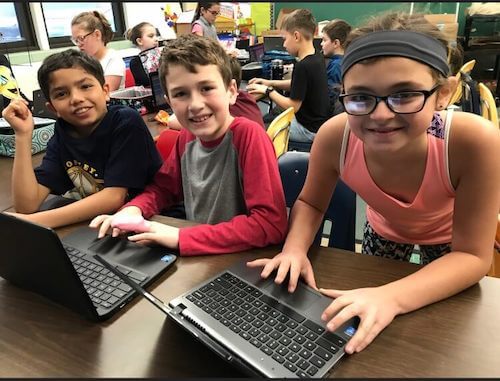
When children learn to code, they also get to practice lots of helpful soft skills—things like talking about ideas, working with others, staying focused, and solving problems.
- Communication: Kids explain what they want to build or fix, ask questions when something doesn’t work, and share their project when it’s finished.
- Focus: They learn not to give up until they solve a tricky problem—just like finishing a game level.
- Organization: They figure out what steps they need to take, decide what comes first, and keep track of everything to make sure their project works.
- Listening and teamwork: Sometimes they need help or ideas from teachers or friends; knowing when to ask and how to work together helps a lot.
All these skills are useful everywhere—not just in coding. And the best part? Kids don’t always realize they’re learning them! With a little help from someone patient (a parent or teacher), and feedback when things are hard, they can grow these skills while having fun.
Improved Math Skills:
Coding offers a powerful solution to kids that think they are bad at math. You don’t need to be a mathematical prodigy to start coding – children learn core math principles naturally as they code. They interact with ideas like sequencing, loops and conditionals. These are the same logical structures that underlie algebra, geometry, and problem solving in general. Coding allows kids to visualize math and see how each piece fits together, instead of only seeing numbers on a page. This grounded, hands-on experience can transform how they understand and enjoy math.
As a result of the level of development differing based on age, the coding skills learned by students in 3rd grade will not be the same as those in 8th grade. Companies like CodeMonkey that provide resources for kids learning to code, set a recommended age range for their products, but tend to acknowledge that younger students may not advance through the curriculum in the same way as older students do.
What Coding Benefits do Students Experience at Different Ages?
While learning from mistakes is a skill observed as early as preschool, exercising creativity mainly develops in elementary school. The following are the grades and correlating coding outcomes that the EdTech arena have found:
Preschool and Kindergarten: Learning from Mistakes and Problem Solving
- Coding helps strengthen the ability of preschoolers and kindergartners to learn and recover from failure since making a mistake while coding is ‘free’ since kids can always delete and try again.
- Thanks to read out loud features, non-readers are able to learn how to code for real! This helps them learn valuable problem solving skills, such as figuring out how to move an object on the screen through different obstacles.
Elementary School: Creativity
- Elementary students, specifically ten-year-olds, love to exercise independence through completing their own projects without the help of an adult. I noticed this first-hand through CodeMonkey’s Meet the Game Builder blog series. Almost all of the students interviewed are ten-years-old. I thought at first it was a coincidence, but teachers who have used Game Builder with their students said that their fourth graders were the most excited about this platform. Why? Because at this age, students are the most eager to experiment and create.
Middle School: Algorithmic, Computational and Sequential Thinking
- In terms of math skills, coding helps students learn algorithmic thinking or in other words, how to strategize which formulas can be applied to other instances in order to come up with quick solutions for various other problems. Middle Schoolers are at an ideal cognitive stage to fully utilize these skills.
- Coding helps students learn computational thinking which helps with recognizing data patterns and behave similarly to the systematic way in which a computer behaves.
- Through coding, middle schoolers can better understand logic and how important sequencing, or the order of commands, is.
- Fun fact for all teachers and parents – these skills also carry over to better performance in math and reading grades on standardized tests!
High School and Beyond: Mastering of Coding Skills
- Students who learn how to code early on are ready to take AP Computer Science once they reach high school. Those who have taken AP Computer Science have been found to later outperform their fellow peers in Statistics and AP Calculus exams. After graduation, these students are fully equipped with 21st century skills that are increasingly valued in the workplace.
It is important to note that the development of computer science skills are also subjective to individual student progress and the amount of time dedicated to completing coding courses. The eventual mastering of these benefits also depends on whether a child’s school offers coding classes.
So, what additional benefits do students with a background in coding enjoy after high school?
Students who have experience with computer programming are more likely to get a high-paying job straight out of college. On average, computer science majors earn 40% more than peers who have not studied computer science.
Computer programming also helps adults to be more efficient in their daily tasks. Whether they are in the kitchen or getting their kids ready for school, the sharp skills of sequential thinking strengthened by computer programming helps adults strategically plan daily tasks in the shortest and most efficient way possible. Think of it this way – a very basic computer programming skill used in text-based code is the use of loops. Loops help the coder write their program in the shortest, clearest and most concise way possible. This kind of thinking can help coders get into the habit of planning ahead and staying organized.


Related Questions:
Can I teach my kids to code?
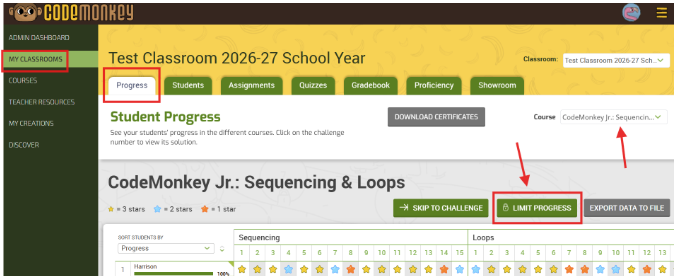
Yes, you can. Anyone can teach coding with a little bit of guidance and instruction. There are many resources out there that offer educators, be it parents, teachers, or coding club instructors, a simple and fun way to teach computer programming. CodeMonkey offers several different coding courses that equip teachers with all the needed resources to teach coding for beginners. Once you sign-up for CodeMonkey, you get a classroom dashboard so you can easily track student progress, detailed lesson plans to help guide you during your class, and solutions to all the challenges so you are always prepared. You can sign-up for free at anytime.
What is the best coding language to teach?
Python is being recognized more and more as the most popular language to use. Its strength is that it is a relatively easy to learn language that has broad uses (as in you can use it for developing a website or game). It is mainly object-oriented, which means that the computer program you build is made out of objects that interact with one another. This can easily be understood in CodeMonkey’s Coding Adventure, which uses CoffeeScript, a less familiar but very useful and easy to learn coding language, where you program the monkey (object) to get to the banana (another object).
How can I teach Python?
A great way to teach Python is through a game-based format. The all-new Banana Tales and Coding Chatbots courses are a great way to teach 5th-9th graders the basics of Python.
Can developing coding skills lead to high-paying jobs?
Absolutely. Developing coding skills can significantly enhance career prospects, especially as automation continues to reshape industries. In 2025, the demand for professionals with coding expertise remains robust, particularly in sectors like technology, healthcare, and education. For instance, roles in data analysis, cybersecurity, technical writing, and quality assurance increasingly value coding proficiency, even if it’s not a primary requirement. Acquiring coding skills can open doors to these opportunities, making your child more competitive in the evolving job market.