A mother of 3 children in elementary school, Keren understands the importance of a Computer Science education from an early age. She has seen firsthand that the best way for children to retain knowledge is to have fun while learning! Keren works as Head of Creative Marketing at CodeMonkey.
Hello! My name is Javier F. Aguilar. I am a technology applications and computer science teacher at the East Fort Fort Worth Montessori Academy. My experience in education is 6 years, however before working in a school environment I was in corporate technology for over 18 years. One of my favorite hobbies is to continually learn computer science applications and teach our elementary students at our school. Since 2014, when I attended my first Code.org training in Austin, TX, I have been engaged with the coding and computer science topics. I must admit that I consider myself a true complete geek that loves working with and on computers since the age of twelve. I have enjoyed networking with other educators like me that love computer science, STEM, and coding. I am a huge LEGO, Minecraft and gamification fan.
I would like to share with you some of the coding websites that I currently use in my curriculum with great success.
Code.org – This web-based resource assists teachers from any grade level to begin teaching computer science. All curriculum from code.org is free and accessible for teachers and students. As an elementary teacher, I use the CS Fundamentals courses (Courses A, B, C, D, E, F, Pre-reader express course, and the express course). However, I have adapted the Computer Science Discoveries course that originally was for middle schools to teach my 5th grade students at our elementary school. This resource works in any platform and operating system.
Bits and Bricks – This LEGO game assist students to use and apply their computational thinking, mathematics, reading, and problem solving skills with our “Bits-LEGO robot” to move from point A to point B in the puzzles in a playful and engaging way.
RobotPuzzle .- I had the opportunity to contact the creator of the RobotPuzzle who told me that this program in Java Script originally was created to teach computer science to a daughter of one of his friends. The coding resource protagonist is a robot that moves with commands in the puzzle avoiding obstacles presented in the game.
BotLogic – BotLogic.us is an educational puzzle game that challenges kids and adults to tackle complex logic problems while teaching valuable programming concepts. Using simple commands (and eventually code), players program their bots to navigate through progressively challenging mazes.
Scratch – This language that uses the block-based and drop concept is a great tool for students to understand the fundamentals of computer science terminology i.e. algorithm, function, sprites, loops, variables, etc. creating their own games and projects.
CodeMonkey – This web-based resource that uses text coding is a great opportunity for students to actually start typing the commands to make the little monkey move through his adventures and eat a lot of bananas. I am proud to be a code monkey ambassador because I truly trust in this engagement products that assist our students to think outside of the box. The CodeMonkey Jr. version available actually in Android and IOS operating system is an excellent resource for PK-2nd grade students to start in early stages learning computer science in a fun way. I witnessed since 2014 when I started using this resource how our students understand the computer science concepts and jump from block to texting coding. I like that CodeMonkey is always updating their curriculum in CoffeeScript and Python programming languages.
CS First with Google – This free computer science curriculum makes coding easy for a teacher and fun to learn for students. As an educator you can access or request “materials for your club or class to teach CS First” Materials are sent to you at no cost by Fedex. However, if you prefer to begin teaching or learning this curriculum quickly – you can download the materials FREE from the CS First website. CS First uses Scratch as a platform with different learning levels from beginners to advanced students with interesting topics to learn.
Tynker – This coding system has different activities for everyone i.e. Barbie, Candy Quest, Space Quest, Monster High, Minecraft, and Star Wars. Additionally, it challenges students to move from beginner to advanced projects. I personally use only the free version available with the block based coding options, however the paid version has available courses for students that are ready to learn text base coding using JavaScript or Python programming languages.
Bitsbox – I started using this learning coding system with my advanced computer club students after school when I noticed that they are ready for accelerated challenges moving from Scratch – block language to using JavaScript language, using the text based projects or applications in real time. I remember using the trading cards that allow learners to type the commands and finalize a game or application with some lines of coding. I have personally applied for a grant to allow our school to order the Bitsbox: levels 1-12 for educators that incorporates into my curriculum and is utilized with my 2nd to 5th grade students with great success. I applied and became an ambassador for this company. I love the platform that Bitsbox uses which is text based coding so students can move to the next level with the programming language – JavaScript.
Processing – This programming language uses Java language commands and instructions as an excellent text based tool to assist students to create visual animated projects. I have used this particular resource for my 4th and 5th grade students. The way I utilize this software is to copy and paste one of the examples that processing has available for everyone and then I edit it – taking a semicolon, square bracket, curly bracket or taking off a close parenthesis to challenge my students to debug and fix the syntax errors in the project.
Codemoji – Codemoji’s computer science curriculum is a visual resource that uses “emojis” to assist students on how to learn the basics of web development and coding, including HTML, CSS, and Javascript, in a fun and easy way. I use this resource for our 4th and 5th grade students due to its text based coding. I like how the process of learning is with examples, trial and error.
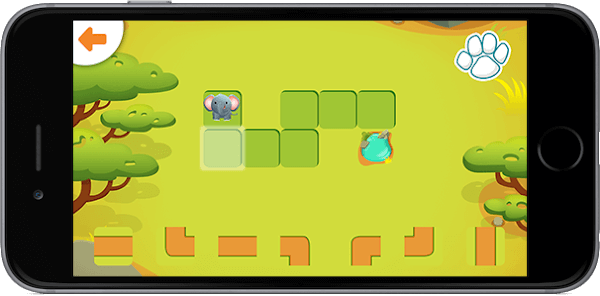
Hopster Coding Safari for Kids – This past year I researched in the App Store and found this great application that assists my PK, Kinder and 1st grade students to do pre-coding logic game levels and animal characters in a fun way. I emailed the creators of this company and humbly requested to see if they could possibly make this great application web based to make it available for more students. As a Title I school, we are not fortunate enough to have iPads for all our students. Currently our school only has a total of 8 iPads for 259 students; however, the application developers responded recently to me that maybe in the future a web-based option may become available. I do rotate the iPads during my classes to ensure that all students have an opportunity to learn this application and other applications that only currently work in the iPad environment.
Continually, I like to check in my local library books, videos of programming, and coding that assist me in getting ideas for our elementary students. Some of the great books that I have ordered and I highly recommend that you read are the following:
I would like to finalize this blog article by encouraging you to include any of these coding resources to your curriculum or create an after school club to spark computer science learning for all students at all ages. You can follow me on twitter @javierfaguilar where I always share free or new coding resources.
Our world today is undergoing a rapid technological change. Which raises a very important question for educators and school leaders – how can we prepare our next generation for all the technological surprises the future holds?
Our world today is undergoing a rapid technological change. Which raises a very important question for educators and school leaders – how can we prepare our next generation for all the technological surprises the future holds?
We use cookies on our website to give you the most relevant experience by remembering your preferences and repeat visits. By clicking “Accept”, you consent to the use of ALL the cookies. However you may visit Cookie Settings to provide a controlled consent.
This website uses cookies to improve your experience while you navigate through the website. Out of these cookies, the cookies that are categorized as necessary are stored on your browser as they are essential for the working of basic functionalities of the website. We also use third-party cookies that help us analyze and understand how you use this website. These cookies will be stored in your browser only with your consent. You also have the option to opt-out of these cookies. But opting out of some of these cookies may have an effect on your browsing experience.
Necessary cookies are absolutely essential for the website to function properly. This category only includes cookies that ensures basic functionalities and security features of the website. These cookies do not store any personal information.
Cookie
Type
Duration
Description
_codemonkey_session_rails_4
1
1 year
_ga
persistent
2 years
This cookie is installed by Google Analytics. The cookie is used to calculate visitor, session, campaign data and keep track of site usage for the site's analytics report. The cookies store information anonymously and assign a randomly generated number to identify unique visitors.
cookielawinfo-checkbox-advertisement
persistent
11 months
The cookie is set by GDPR cookie consent to record the user consent for the cookies in the category "Advertisement".
cookielawinfo-checkbox-analytics
persistent
11 months
This cookies is set by GDPR Cookie Consent WordPress Plugin. The cookie is used to remember the user consent for the cookies under the category "Analytics".
cookielawinfo-checkbox-functional
persistent
11 months
cookielawinfo-checkbox-necessary
persistent
11 months
This cookie is set by GDPR Cookie Consent plugin. The cookies is used to store the user consent for the cookies in the category "Necessary".
cookielawinfo-checkbox-non-necessary
0
11 months
This cookie is set by GDPR Cookie Consent plugin. The cookies is used to store the user consent for the cookies in the category "Non Necessary".
cookielawinfo-checkbox-other
persistent
11 months
cookielawinfo-checkbox-performance
persistent
11 months
This cookie is used to keep track of which cookies the user have approved for this site.
JSESSIONID
1
1 year
Used by sites written in JSP. General purpose platform session cookies that are used to maintain users' state across page requests.
viewed_cookie_policy
persistent
1 hour
The cookie is set by the GDPR Cookie Consent plugin and is used to store whether or not user has consented to the use of cookies. It does not store any personal data.
XSRF-TOKEN
persistent
1 year
The cookie is set by Wix website building platform on Wix website. The cookie is used for security purposes.
Any cookies that may not be particularly necessary for the website to function and is used specifically to collect user personal data via analytics, ads, other embedded contents are termed as non-necessary cookies. It is mandatory to procure user consent prior to running these cookies on your website.
Cookie
Type
Duration
Description
rlas3
persistent
11 months
The cookie is set by rlcdn.com. The cookie is used to serve relevant ads to the visitor as well as limit the time the visitor sees an and also measure the effectiveness of the campaign.
UserMatchHistory
persistent
1 month
Linkedin - Used to track visitors on multiple websites, in order to present relevant advertisement based on the visitor's preferences.
This cookie is set by Google Analytics and is used to distinguish users and sessions. The cookie is created when the JavaScript library executes and there are no existing __utma cookies. The cookie is updated every time data is sent to Google Analytics.
__utmb
persistent
30 minutes
The cookie is set by Google Analytics. The cookie is used to determine new sessions/visits. The cookie is created when the JavaScript library executes and there are no existing __utma cookies. The cookie is updated every time data is sent to Google Analytics.
__utmc
persistent
1 year
The cookie is set by Google Analytics and is deleted when the user closes the browser. The cookie is not used by ga.js. The cookie is used to enable interoperability with urchin.js which is an older version of Google analytics and used in conjunction with the __utmb cookie to determine new sessions/visits.
__utmt
persistent
10 minutes
The cookie is set by Google Analytics and is used to throttle request rate.
__utmz
persistent
6 months
This cookie is set by Google analytics and is used to store the traffic source or campaign through which the visitor reached your site.
_gat
persistent
1 minute
This cookies is installed by Google Universal Analytics to throttle the request rate to limit the colllection of data on high traffic sites.
YSC
1
1 year
This cookies is set by Youtube and is used to track the views of embedded videos.
This cookie is used by Google Analytics to understand user interaction with the website.
_gid
persistent
1 day
This cookie is installed by Google Analytics. The cookie is used to store information of how visitors use a website and helps in creating an analytics report of how the wbsite is doing. The data collected including the number visitors, the source where they have come from, and the pages viisted in an anonymous form.
GPS
persistent
30 minutes
This cookie is set by Youtube and registers a unique ID for tracking users based on their geographical location
MR
persistent
5 months
This cookie is used to measure the use of the website for analytics purposes.
MUIDB
1
1 year
This cookie is used by MicroSoft and collects data about users of visits on multiple website. This data is used to analyze the efficiency of advertisements on websites.
This cookie is set by Facebook to deliver advertisement when they are on Facebook or a digital platform powered by Facebook advertising after visiting this website.
bscookie
1
2 years
This cookie is a browser ID cookie set by Linked share Buttons and ad tags.
fr
1
3 months
The cookie is set by Facebook to show relevant advertisments to the users and measure and improve the advertisements. The cookie also tracks the behavior of the user across the web on sites that have Facebook pixel or Facebook social plugin.
IDE
1
2 years
Used by Google DoubleClick and stores information about how the user uses the website and any other advertisement before visiting the website. This is used to present users with ads that are relevant to them according to the user profile.
MUID
persistent
1 year
Used by Microsoft as a unique identifier. The cookie is set by embedded Microsoft scripts. The purpose of this cookie is to synchronize the ID across many different Microsoft domains to enable user tracking.
pxrc
persistent
2 months
The purpose of the cookie is to identify a visitor to serve relevant advertisement.
rlas3
persistent
11 months
The cookie is set by rlcdn.com. The cookie is used to serve relevant ads to the visitor as well as limit the time the visitor sees an and also measure the effectiveness of the campaign.
skimCSP
persistent
11 months
This cookie is set by SkimResources. The cookie is used to record data on the visitor to optimize the relevance of the advretisements served to the users.
TapAd_DID
persistent
2 months
The cookie is set by tapad.com. The purpose of the cookie is to track users across devices to enable targeted advertising
TapAd_TS
persistent
2 months
The cookie is set by Tapad.com. The purpose of the cookie is to track users across devices to enable targeted advertising.
TDCPM
persistent
1 year
The cookie is set by CloudFare service to store a unique ID to identify a returning users device which then is used for targeted advertising.
TDID
persistent
1 year
The cookie is set by CloudFare service to store a unique ID to identify a returning users device which then is used for targeted advertising.
test_cookie
persistent
15 minutes
This cookie is set by doubleclick.net. The purpose of the cookie is to determine if the users' browser supports cookies.
VISITOR_INFO1_LIVE
1
5 months
This cookie is set by Youtube. Used to track the information of the embedded YouTube videos on a website.