Vitaly is the Digital Marketing Manager at CodeMonkey. His master's degree in Computer Science, combined with his experience as a father of two sons, helps him create content focused on coding education.
Professional Development: Getting Teachers Comfortable with Coding
Teaching is one of those professions that demands a vast array of skills, from subject knowledge and interpersonal mastery to expertise in IT and coding. But here’s the secret: many teachers shy away from the IT stuff because they’re naturally cautious of it.
However, with the proper guidance, we can all become proficient enough to stand in front of a class to deliver coding sessions. Basic coding practices can simplify a teacher’s workday in various ways: focus your PD towards coding, and you’ll find a whole new way to bring the abstract world of computer languages to life for your students.
And it’s not just the proficiency required to teach basic coding principles. Once you understand the fundamentals of coding, you can apply it to a range of applications, like spreadsheets and timetables.
Let’s explore how to get teachers comfortable with coding.
How can I possibly teach coding (when I can’t even do it myself)?
We’ve all seen strings of numbers and incomprehensible phrases dripping down the screen in sci-fi movies. It looks purposefully intimidating and covert — but that’s because it’s a movie, and it wouldn’t be very exciting if it were a string of easy-to-understand instructions for making a cup of coffee.
But essentially, coding IS just a string of instructions directing a machine to complete a specific task. Those instructions are called an algorithm, which underpins the type of coding you’ll be teaching students to recognize and manipulate.
And essentially, the heart of code education is understanding that you’re simply learning to operate a machine to successfully complete a task.
But how do you do it?
Find the right coding platform
Some coders use basic text editors, such as TextEdit on Mac or Notepad on Windows, for programming, while others use dedicated platforms like Visual Studio, IntelliJ IDEA, and Xcode.
However, those platforms aren’t designed for learners—those are for the pros, and starting in one of those environments is a sure path to confusion for a newbie.
But, using the right learning platform, designed to make coding visual and fun, can help YOU learn how to code and turn the dry task of teaching commands into a fun, engaging classroom activity.
Learning to code is fun
There are many ways a child (and a teacher) can learn the fundamentals of coding. You could teach it like any language lesson, demonstrating how words relate to operations; explaining complex syntax, and teaching specific phrases.
But that’s not a lot of FUN. And teaching coding in this way could send children to sleep.
This is why we developed the CodeMonkey platform: designed to bring coding to life through engaging games and non-destructive experimentation. And while we’re not the only platform offering game-based coding games, we have worked hard to create a learning environment that’s easy for teachers to navigate and learners to interact with.
Bringing coding to life for kids (and teachers)
Coding feels like a foreign language to most teachers. And that’s no surprise, because it is, essentially, a foreign language.
However, coding doesn’t follow the syntax of spoken languages.
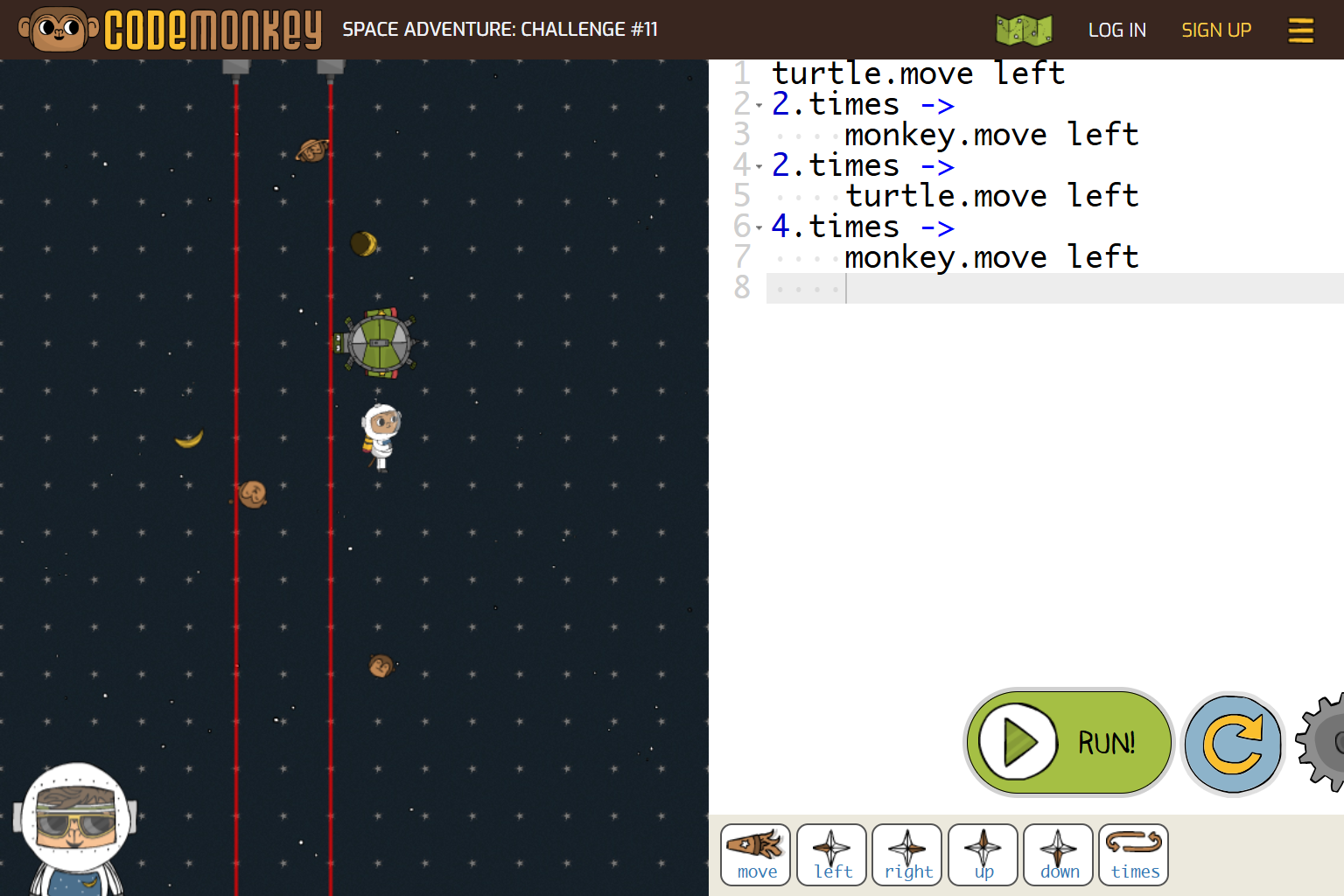
This is a piece of code a child might write for our Space Adventure game. It begins with simple code that any child can manage, and becomes progressively more challenging with each level. The task is to get the Space Monkey to the Space Bananas, work around the obstacles (such as laser beams).
The code is built for you to begin with, constructed using the simple icons at the bottom of the screen. And as you progress through each level, tasks require more forethought, using loops, operations, and sequences.
And in no time, the learner becomes so accustomed to the way the language is presented on the screen that they understand how to manipulate the actual code to complete their own tasks.
Try Space Adventure for yourself
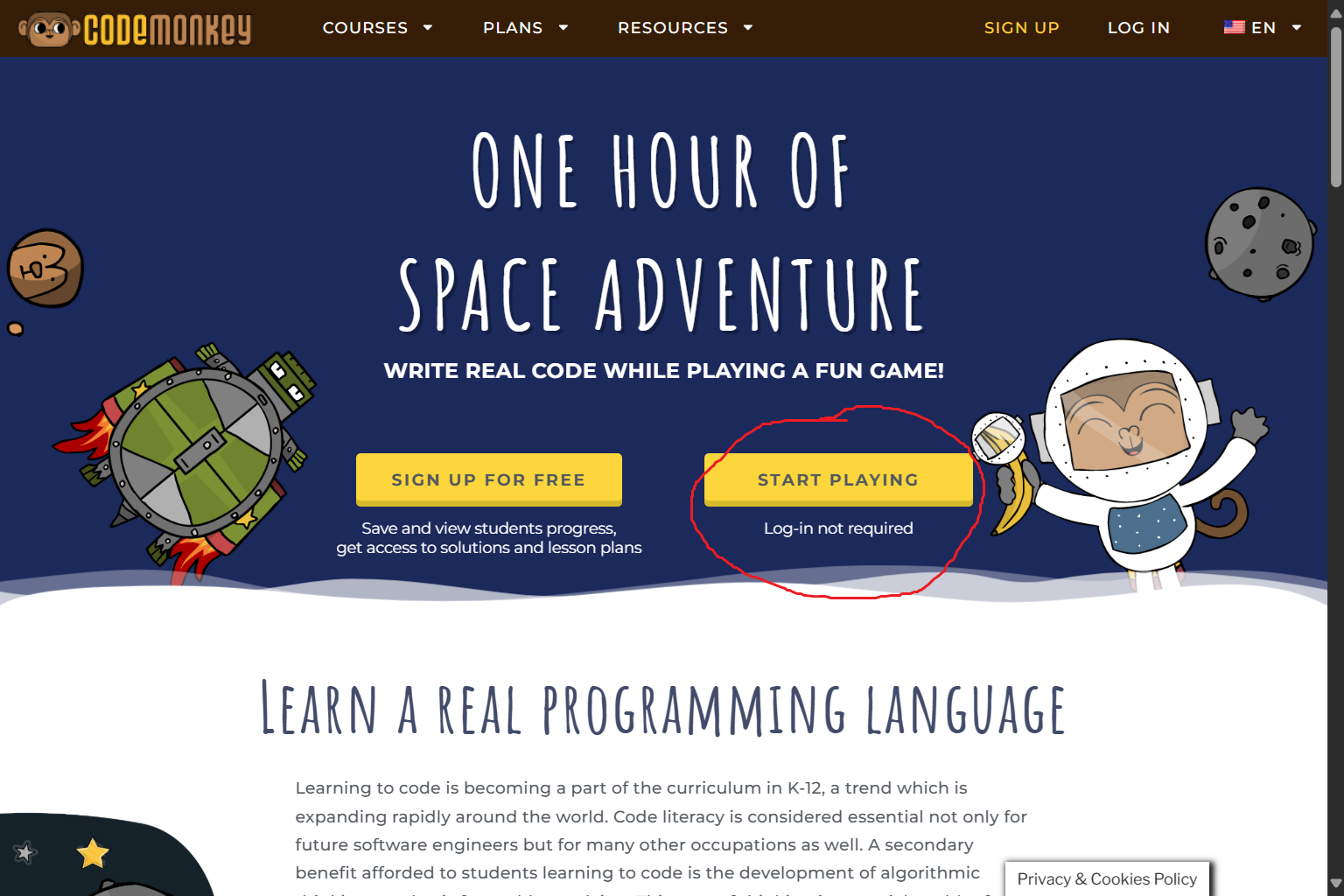
You can try Space Adventure for free in our Hour of Coding section.
You’ll find that the simple interface provides all the tools you need to complete (and understand) each task. And through trial and error, you’ll be able to control the characters to reach their destination.
Why trial and error is valuable for coders
One of the other things you’ll discover as you try the Space Adventure tasks is that it doesn’t matter if you get it wrong. You’ll receive instant visual feedback that confirms whether your coding successfully completes the challenge. And it’s easy to go back and try again without any sense of failure.
This non-judgmental approach to discovery encourages learners to experiment with alternative methods for solving the same task, thereby activating their curiosity and empowering them to develop robust problem-solving skills.
Why every teacher should learn how to code
Whatever your specialist subject, coding offers innovative and creative tools that can help you bring learning plans to life. As teachers, we innately recognize that children have different learning styles—so it stands to reason that teachers also learn in various ways.
And while the idea of stepping into the classroom to teach a subject we’re learning ourselves feels intimidating, coding enhances a wide range of learning skills, including:
Problem-solving: Coders learn to overcome challenges and experiment with alternative approaches in a safe environment where nothing will break!
Creative thought: Coders recognize that there are multiple ways to approach a challenge.
Digital literacy: Kids natively use electronic devices for play and entertainment. So, coding shows them how to control the machines to create games for themselves.
Collaborative learning: Learning to code often requires students to work together to overcome a problem.
Boost your digital literacy with coding
When teachers build their coding confidence, they open up possibilities for integrating kinesthetic learning into the classroom. Indeed, understanding coding allows you to bridge the gap between theoretical concepts and their practical applications.
You could use coding to help visualise data in maths and stats-based presentations and subjects, or you could create interactive timelines for bringing history to life.
Kids are digital natives, having grown up with digital devices at their fingertips; therefore, a teacher who can effectively embrace digital learning is more likely to engage their learners in dynamic and impactful ways.
What are the barriers to integrating coding into your classroom?
One of the most significant barriers to integrating technology into the classroom is the belief that technology is likely to malfunction. And we all know that when things go wrong in the classroom, your focus gets significantly tested.
It seems that the more complex the equipment, the more likely things are to go awry. And that’s stressful.
However, many platforms, including CodeMonkey, utilize simple web applications that require no installation—you simply run the software directly from a web browser. Therefore, it’s possible to run coding platforms on relatively basic laptops and tablets, such as affordable Chromebooks and Raspberry Pis.
Some of the ways things can go wrong (and how to mitigate them)
Lack of computers: You don’t need one computer or tablet per student. In fact, coding is the perfect frame to developing teamwork skills. You could have two or three learners per device, which requires some classroom management on your part, but can work very effectively.
Poor internet connectivity: This is the big potential problem when using web-apps in the classroom. However, one of the most effective ways to overcome this is to prioritize the school network in your classroom during your coding lesson. That way, you can optimize your lesson’s bandwidth.
Insufficient training: This is the big one—how can you feel confident without the necessary skillset? Well, read on for details of CodeMonkey’s Teacher PD sessions.
CodeMonkey is designed with teachers in mind
Our game-based learning platform uses fun, age-appropriate animated characters, and we dedicate each level of the game to new coding concepts. This allows children to progress through each level at their own pace, developing their understanding through play, experimentation, trial and error, and problem-solving.
Each course comes with specific lesson plans that help you guide your learners through the activities.
However, you will also be learning how to navigate a new platform at the same time, which is why we have developed a teacher’s Professional Development programme, suited to teachers of all levels and experiences.
Teachers’ PD with CodeMonkey
We’ve aimed to make our CodeMonkey platform as teacher-friendly as possible. However, you may still need some guidance to make the most of our resources.
We offer comprehensive lesson plans to accompany our courses, helping you bring your coding lessons to life in the classroom. But we don’t expect you to have the immediate skills to teach coding, which is why we offer live Professional Development webinars to help introduce teachers to the platform while empowering them to teach coding with our resources confidently.
We provide an in-depth view of our courses while explaining the coding concepts you’ll need to understand from a conceptual level.
And by the end of your webinar, you’ll enjoy a solid understanding of how to integrate the CodeMonkey platform into your curricular articles.
CodeMonkey’s learning resources
We offer everything from a curated, user-friendly platform that encourages game-based learning to out-of-the-box, tried-and-tested lesson plans. So, you’re never on your own.
We offer learning programmes suitable from Pre-K & Kindergarten, all the way to 8th Grade and beyond.
Ready to get started?
We hope we’ve reassured you that classroom coding lessons are accessible for even the most nervous technophobic teachers. But if you have questions, don’t hesitate to get in touch.
We’re here to help, and we’d love to help give you the confidence to deliver engaging, interactive classroom sessions that surprise even yourself!
Our world today is undergoing a rapid technological change. Which raises a very important question for educators and school leaders – how can we prepare our next generation for all the technological surprises the future holds?
We use cookies on our website to give you the most relevant experience by remembering your preferences and repeat visits. By clicking “Accept”, you consent to the use of ALL the cookies. However you may visit Cookie Settings to provide a controlled consent.
This website uses cookies to improve your experience while you navigate through the website. Out of these cookies, the cookies that are categorized as necessary are stored on your browser as they are essential for the working of basic functionalities of the website. We also use third-party cookies that help us analyze and understand how you use this website. These cookies will be stored in your browser only with your consent. You also have the option to opt-out of these cookies. But opting out of some of these cookies may have an effect on your browsing experience.
Necessary cookies are absolutely essential for the website to function properly. This category only includes cookies that ensures basic functionalities and security features of the website. These cookies do not store any personal information.
Cookie
Type
Duration
Description
_codemonkey_session_rails_4
1
1 year
_ga
persistent
2 years
This cookie is installed by Google Analytics. The cookie is used to calculate visitor, session, campaign data and keep track of site usage for the site's analytics report. The cookies store information anonymously and assign a randomly generated number to identify unique visitors.
cookielawinfo-checkbox-advertisement
persistent
11 months
The cookie is set by GDPR cookie consent to record the user consent for the cookies in the category "Advertisement".
cookielawinfo-checkbox-analytics
persistent
11 months
This cookies is set by GDPR Cookie Consent WordPress Plugin. The cookie is used to remember the user consent for the cookies under the category "Analytics".
cookielawinfo-checkbox-functional
persistent
11 months
cookielawinfo-checkbox-necessary
persistent
11 months
This cookie is set by GDPR Cookie Consent plugin. The cookies is used to store the user consent for the cookies in the category "Necessary".
cookielawinfo-checkbox-non-necessary
0
11 months
This cookie is set by GDPR Cookie Consent plugin. The cookies is used to store the user consent for the cookies in the category "Non Necessary".
cookielawinfo-checkbox-other
persistent
11 months
cookielawinfo-checkbox-performance
persistent
11 months
This cookie is used to keep track of which cookies the user have approved for this site.
JSESSIONID
1
1 year
Used by sites written in JSP. General purpose platform session cookies that are used to maintain users' state across page requests.
viewed_cookie_policy
persistent
1 hour
The cookie is set by the GDPR Cookie Consent plugin and is used to store whether or not user has consented to the use of cookies. It does not store any personal data.
XSRF-TOKEN
persistent
1 year
The cookie is set by Wix website building platform on Wix website. The cookie is used for security purposes.
Any cookies that may not be particularly necessary for the website to function and is used specifically to collect user personal data via analytics, ads, other embedded contents are termed as non-necessary cookies. It is mandatory to procure user consent prior to running these cookies on your website.
Cookie
Type
Duration
Description
rlas3
persistent
11 months
The cookie is set by rlcdn.com. The cookie is used to serve relevant ads to the visitor as well as limit the time the visitor sees an and also measure the effectiveness of the campaign.
UserMatchHistory
persistent
1 month
Linkedin - Used to track visitors on multiple websites, in order to present relevant advertisement based on the visitor's preferences.
This cookie is set by Google Analytics and is used to distinguish users and sessions. The cookie is created when the JavaScript library executes and there are no existing __utma cookies. The cookie is updated every time data is sent to Google Analytics.
__utmb
persistent
30 minutes
The cookie is set by Google Analytics. The cookie is used to determine new sessions/visits. The cookie is created when the JavaScript library executes and there are no existing __utma cookies. The cookie is updated every time data is sent to Google Analytics.
__utmc
persistent
1 year
The cookie is set by Google Analytics and is deleted when the user closes the browser. The cookie is not used by ga.js. The cookie is used to enable interoperability with urchin.js which is an older version of Google analytics and used in conjunction with the __utmb cookie to determine new sessions/visits.
__utmt
persistent
10 minutes
The cookie is set by Google Analytics and is used to throttle request rate.
__utmz
persistent
6 months
This cookie is set by Google analytics and is used to store the traffic source or campaign through which the visitor reached your site.
_gat
persistent
1 minute
This cookies is installed by Google Universal Analytics to throttle the request rate to limit the colllection of data on high traffic sites.
YSC
1
1 year
This cookies is set by Youtube and is used to track the views of embedded videos.
This cookie is used by Google Analytics to understand user interaction with the website.
_gid
persistent
1 day
This cookie is installed by Google Analytics. The cookie is used to store information of how visitors use a website and helps in creating an analytics report of how the wbsite is doing. The data collected including the number visitors, the source where they have come from, and the pages viisted in an anonymous form.
GPS
persistent
30 minutes
This cookie is set by Youtube and registers a unique ID for tracking users based on their geographical location
MR
persistent
5 months
This cookie is used to measure the use of the website for analytics purposes.
MUIDB
1
1 year
This cookie is used by MicroSoft and collects data about users of visits on multiple website. This data is used to analyze the efficiency of advertisements on websites.
This cookie is set by Facebook to deliver advertisement when they are on Facebook or a digital platform powered by Facebook advertising after visiting this website.
bscookie
1
2 years
This cookie is a browser ID cookie set by Linked share Buttons and ad tags.
fr
1
3 months
The cookie is set by Facebook to show relevant advertisments to the users and measure and improve the advertisements. The cookie also tracks the behavior of the user across the web on sites that have Facebook pixel or Facebook social plugin.
IDE
1
2 years
Used by Google DoubleClick and stores information about how the user uses the website and any other advertisement before visiting the website. This is used to present users with ads that are relevant to them according to the user profile.
MUID
persistent
1 year
Used by Microsoft as a unique identifier. The cookie is set by embedded Microsoft scripts. The purpose of this cookie is to synchronize the ID across many different Microsoft domains to enable user tracking.
pxrc
persistent
2 months
The purpose of the cookie is to identify a visitor to serve relevant advertisement.
rlas3
persistent
11 months
The cookie is set by rlcdn.com. The cookie is used to serve relevant ads to the visitor as well as limit the time the visitor sees an and also measure the effectiveness of the campaign.
skimCSP
persistent
11 months
This cookie is set by SkimResources. The cookie is used to record data on the visitor to optimize the relevance of the advretisements served to the users.
TapAd_DID
persistent
2 months
The cookie is set by tapad.com. The purpose of the cookie is to track users across devices to enable targeted advertising
TapAd_TS
persistent
2 months
The cookie is set by Tapad.com. The purpose of the cookie is to track users across devices to enable targeted advertising.
TDCPM
persistent
1 year
The cookie is set by CloudFare service to store a unique ID to identify a returning users device which then is used for targeted advertising.
TDID
persistent
1 year
The cookie is set by CloudFare service to store a unique ID to identify a returning users device which then is used for targeted advertising.
test_cookie
persistent
15 minutes
This cookie is set by doubleclick.net. The purpose of the cookie is to determine if the users' browser supports cookies.
VISITOR_INFO1_LIVE
1
5 months
This cookie is set by Youtube. Used to track the information of the embedded YouTube videos on a website.