Code.org – This web-based resource assists teachers from any grade level to begin teaching computer science. All curriculum from code.org is free and accessible for teachers and students. As an elementary teacher, I use the CS Fundamentals courses (Courses A, B, C, D, E, F, Pre-reader express course, and the express course). However, I have adapted the Computer Science Discoveries course that originally was for middle schools to teach my 5th grade students at our elementary school. This resource works in any platform and operating system.
Bits and Bricks – This LEGO game assist students to use and apply their computational thinking, mathematics, reading, and problem solving skills with our “Bits-LEGO robot” to move from point A to point B in the puzzles in a playful and engaging way.
RobotPuzzle .- I had the opportunity to contact the creator of the RobotPuzzle who told me that this program in Java Script originally was created to teach computer science to a daughter of one of his friends. The coding resource protagonist is a robot that moves with commands in the puzzle avoiding obstacles presented in the game.
BotLogic – BotLogic.us is an educational puzzle game that challenges kids and adults to tackle complex logic problems while teaching valuable programming concepts. Using simple commands (and eventually code), players program their bots to navigate through progressively challenging mazes.
Scratch – This language that uses the block-based and drop concept is a great tool for students to understand the fundamentals of computer science terminology i.e. algorithm, function, sprites, loops, variables, etc. creating their own games and projects.
CodeMonkey - Este recurso basado en la web que utiliza codificación de texto es una gran oportunidad para que los estudiantes comiencen a escribir los comandos para hacer que el pequeño mono se mueva a través de sus aventuras y coma muchos plátanos. Estoy orgulloso de ser un embajador de Code Monkey porque realmente confío en estos productos de participación que ayudan a nuestros estudiantes a pensar fuera de la caja. El CodeMonkey Jr. La versión disponible actualmente en el sistema operativo Android e IOS es un recurso excelente para que los estudiantes de PK a 2 ° grado comiencen en las primeras etapas a aprender ciencias de la computación de una manera divertida. Desde 2014, cuando comencé a usar este recurso, fui testigo de cómo nuestros estudiantes entienden los conceptos de ciencias de la computación y saltan del bloque a la codificación de mensajes de texto. Me gusta que CodeMonkey siempre esté actualizando su plan de estudios en los lenguajes de programación CoffeeScript y Python.

CS First with Google – This free computer science curriculum makes coding easy for a teacher and fun to learn for students. As an educator you can access or request “materials for your club or class to teach CS First” Materials are sent to you at no cost by Fedex. However, if you prefer to begin teaching or learning this curriculum quickly – you can download the materials FREE from the CS First website. CS First uses Scratch as a platform with different learning levels from beginners to advanced students with interesting topics to learn.
Tynker – This coding system has different activities for everyone i.e. Barbie, Candy Quest, Space Quest, Monster High, Minecraft, and Star Wars. Additionally, it challenges students to move from beginner to advanced projects. I personally use only the free version available with the block based coding options, however the paid version has available courses for students that are ready to learn text base coding using JavaScript or Python programming languages.
Bitsbox – I started using this learning coding system with my advanced computer club students after school when I noticed that they are ready for accelerated challenges moving from Scratch – block language to using JavaScript language, using the text based projects or applications in real time. I remember using the trading cards that allow learners to type the commands and finalize a game or application with some lines of coding. I have personally applied for a grant to allow our school to order the Bitsbox: levels 1-12 for educators that incorporates into my curriculum and is utilized with my 2nd to 5th grade students with great success. I applied and became an ambassador for this company. I love the platform that Bitsbox uses which is text based coding so students can move to the next level with the programming language – JavaScript.
Processing – This programming language uses Java language commands and instructions as an excellent text based tool to assist students to create visual animated projects. I have used this particular resource for my 4th and 5th grade students. The way I utilize this software is to copy and paste one of the examples that processing has available for everyone and then I edit it – taking a semicolon, square bracket, curly bracket or taking off a close parenthesis to challenge my students to debug and fix the syntax errors in the project.
Codemoji – Codemoji’s computer science curriculum is a visual resource that uses “emojis” to assist students on how to learn the basics of web development and coding, including HTML, CSS, and Javascript, in a fun and easy way. I use this resource for our 4th and 5th grade students due to its text based coding. I like how the process of learning is with examples, trial and error.
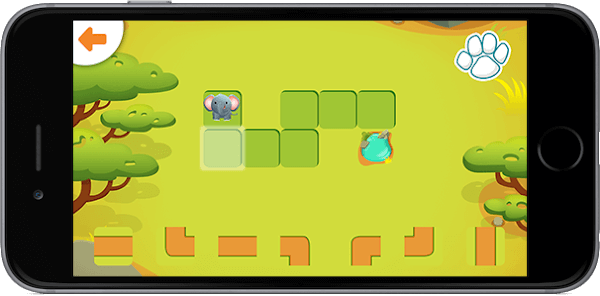
Hopster Coding Safari for Kids – This past year I researched in the App Store and found this great application that assists my PK, Kinder and 1st grade students to do pre-coding logic game levels and animal characters in a fun way. I emailed the creators of this company and humbly requested to see if they could possibly make this great application web based to make it available for more students. As a Title I school, we are not fortunate enough to have iPads for all our students. Currently our school only has a total of 8 iPads for 259 students; however, the application developers responded recently to me that maybe in the future a web-based option may become available. I do rotate the iPads during my classes to ensure that all students have an opportunity to learn this application and other applications that only currently work in the iPad environment.