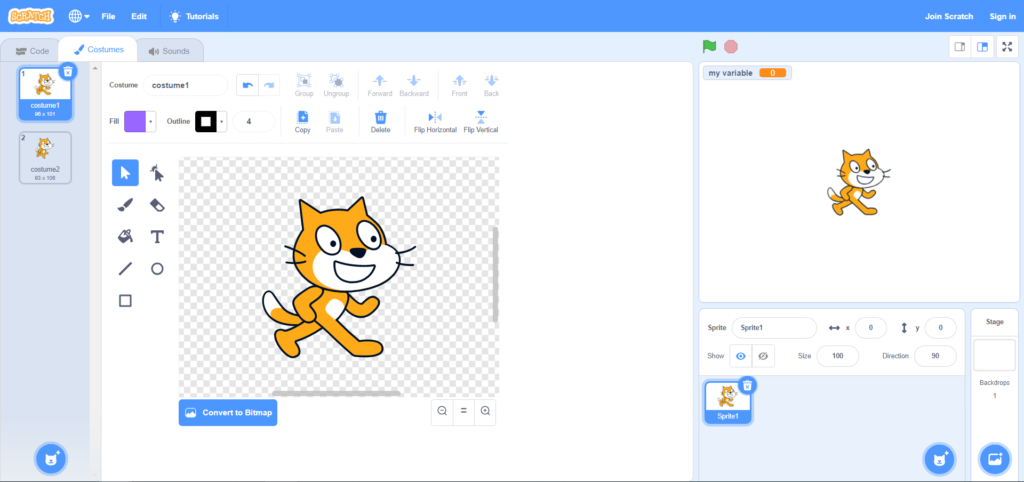
Scratch is a visual programming language focused on
fostering creativity and logical thinking. Although any age is good to learn,
children are ideal recipients for Scratch. By teaching them how to use Scratch
we are helping them to face and solve situations and problems of all kinds in a
logical and structured way.
When we begin to teach a child to program in Scratch, the main objective should be to be able to grasp and assimilate concepts, basic ideas and workflows about programming and computational thinking in a fun and attractive way, so that an interest and technical basis generate courage to study.
Benefits of
Children Learning Programming with Scratch
Scratch is a visual language developed by MIT and that
is based on blocks coming together as a puzzle. It is a simple way to learn
programming. But that simplicity of the interface or its color should not hide
powerful language that admits large projects that can be achieved gradually.
Encouraging the Creativity and Logical Thinking
The use of Scratch encourages the development of
logical thinking through the search for different solutions to a problem. By
programming, the child is able to develop his capacity to be more structured and
organized in the management of resources and the use of tools that lead him to
reach the resolution of a specific task.
The colored blocks are grouped, dragged and released
to obtain an immediate result. Speaking of children, it allows them to create
movements, add sounds, change scenarios or create games in a simple way,
contributing to develop their creativity.
The recommended age to start using Scratch would be
6-7 years or when they start reading fluently. But if not, there is the Junior
version in which, on the same basis, the language is purely visual.
How to start with Scratch. Installation and first steps
Starting to have fun and learn with Scratch is fast,
simple and free. The new version Scratch 3.0 leaves Flash behind and this
allows us to use it in any current device without problems.
It works via web browser, so both computers and
tablets and even smartphones can be used to execute programs made with Scratch.
Just go to the Scratch web address and get started.
If you prefer to use a local version that does not
require an Internet connection, there are desktop versions of Scratch 3.0 for
Windows, Linux and Mac operating systems.
Although to use Scratch it is not necessary to make a
registration, it is advisable to create an account for the child and so that he
can save the projects he is doing. Or to continue with one already done or not
finished.
Registration is open and there are no minimum age
requirements, but it is necessary to confirm the account with an email from the
parent / tutor.
First Projects With Scratch
Once we have the necessary resources and equipment,
the most important and expected moment of all comes: start programming with
Scratch. At these early ages it is vital that learning be meaningful and also
fun. If we get the child to learn Scratch while having fun, we have a good
chance of getting it.
Games and Small Projects
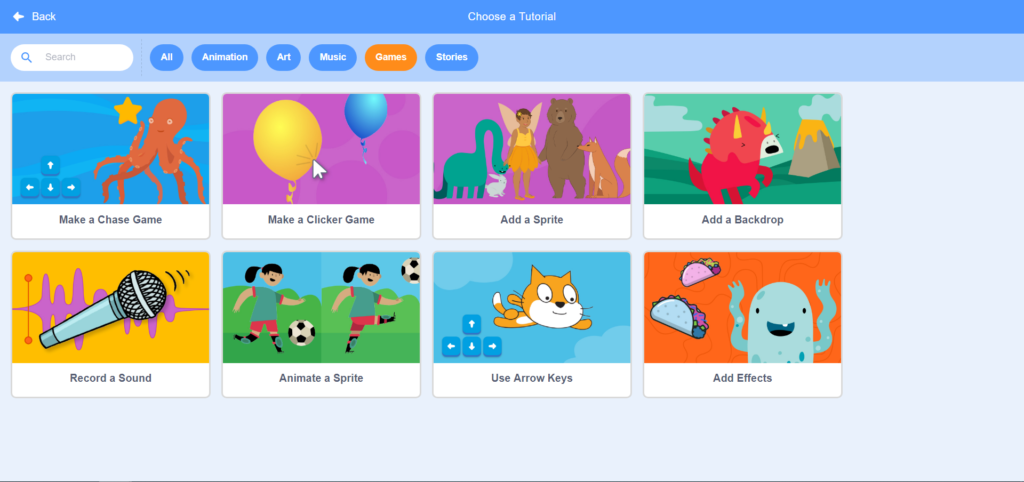
The ideal way to start programming with Scratch is to
learn based on challenges with games and small projects where children can
unleash their creativity.
With the new version 3.0 which resource has been enhanced
and is now more intuitive. It allows practice while watching video or animated
images. In addition, they now include a teacher’s guide and the programming
cards associated with that particular project.
Once the children already know the interface and some
of the options, from MIT they offer simple projects associated with different
areas and objectives. In these projects children should modify the base project
freely, modifying or adding elements according to their criteria.
Any project published in Scratch can be used as a
basis for learning. Just “look inside” to begin to know the code with
which it is built and freely modify or adapt it
Another resource recognized and guided with the help
of videos is the Hour of Code. Through short and even thematic activities such
as the Carton Network, the child can have short-term first contact on
programming.
Although there are projects or guided games with a
fixed structure that must be followed, it is recommended that children
themselves can make personal decisions or trial / error tests with elements
that do not alter the main objective of the programming exercise but that help
them be participants in their learning.
Another recommendation to teach Scratch to children is
that we can preview to change or add new features and improvements once the
project base is finished. With this we continue promoting their creativity as
well as learning at their own pace.
Combining physical Elements with Scratch
When the children already know the Scratch interface, the main blocks and have made their first projects, it is a good time to enhance further their creativity with the help of physical elements that can be programmed using Scratch directly. Children will see that they can build robots with recycled materials or pianos using fruits, and then they are the ones who decide how they should work.
ABOUT THE AUTHOR:
Nicholas H. Parker is one of web designers at Buy Essay Club. He worked as an SEO specialist for more than 5 years. It helped him estimate and analyze the business sphere better. Besides, he tries to keep up with advancing technologies.
Our world today is undergoing a rapid technological change. Which raises a very important question for educators and school leaders – how can we prepare our next generation for all the technological surprises the future holds?
Stay Up To Date on The Latest NEWS AND LEARN MORE ABOUT CODING FOR KIDS.
We use cookies on our website to give you the most relevant experience by remembering your preferences and repeat visits. By clicking “Accept”, you consent to the use of ALL the cookies. However you may visit Cookie Settings to provide a controlled consent.
This website uses cookies to improve your experience while you navigate through the website. Out of these cookies, the cookies that are categorized as necessary are stored on your browser as they are essential for the working of basic functionalities of the website. We also use third-party cookies that help us analyze and understand how you use this website. These cookies will be stored in your browser only with your consent. You also have the option to opt-out of these cookies. But opting out of some of these cookies may have an effect on your browsing experience.
Necessary cookies are absolutely essential for the website to function properly. This category only includes cookies that ensures basic functionalities and security features of the website. These cookies do not store any personal information.
Cookie
Type
Duration
Description
_codemonkey_session_rails_4
1
1 year
_ga
persistent
2 years
This cookie is installed by Google Analytics. The cookie is used to calculate visitor, session, campaign data and keep track of site usage for the site's analytics report. The cookies store information anonymously and assign a randomly generated number to identify unique visitors.
cookielawinfo-checkbox-advertisement
persistent
11 months
The cookie is set by GDPR cookie consent to record the user consent for the cookies in the category "Advertisement".
cookielawinfo-checkbox-analytics
persistent
11 months
This cookies is set by GDPR Cookie Consent WordPress Plugin. The cookie is used to remember the user consent for the cookies under the category "Analytics".
cookielawinfo-checkbox-functional
persistent
11 months
cookielawinfo-checkbox-necessary
persistent
11 months
This cookie is set by GDPR Cookie Consent plugin. The cookies is used to store the user consent for the cookies in the category "Necessary".
cookielawinfo-checkbox-non-necessary
0
11 months
This cookie is set by GDPR Cookie Consent plugin. The cookies is used to store the user consent for the cookies in the category "Non Necessary".
cookielawinfo-checkbox-other
persistent
11 months
cookielawinfo-checkbox-performance
persistent
11 months
This cookie is used to keep track of which cookies the user have approved for this site.
JSESSIONID
1
1 year
Used by sites written in JSP. General purpose platform session cookies that are used to maintain users' state across page requests.
viewed_cookie_policy
persistent
1 hour
The cookie is set by the GDPR Cookie Consent plugin and is used to store whether or not user has consented to the use of cookies. It does not store any personal data.
XSRF-TOKEN
persistent
1 year
The cookie is set by Wix website building platform on Wix website. The cookie is used for security purposes.
Any cookies that may not be particularly necessary for the website to function and is used specifically to collect user personal data via analytics, ads, other embedded contents are termed as non-necessary cookies. It is mandatory to procure user consent prior to running these cookies on your website.
Cookie
Type
Duration
Description
rlas3
persistent
11 months
The cookie is set by rlcdn.com. The cookie is used to serve relevant ads to the visitor as well as limit the time the visitor sees an and also measure the effectiveness of the campaign.
UserMatchHistory
persistent
1 month
Linkedin - Used to track visitors on multiple websites, in order to present relevant advertisement based on the visitor's preferences.
This cookie is set by Google Analytics and is used to distinguish users and sessions. The cookie is created when the JavaScript library executes and there are no existing __utma cookies. The cookie is updated every time data is sent to Google Analytics.
__utmb
persistent
30 minutes
The cookie is set by Google Analytics. The cookie is used to determine new sessions/visits. The cookie is created when the JavaScript library executes and there are no existing __utma cookies. The cookie is updated every time data is sent to Google Analytics.
__utmc
persistent
1 year
The cookie is set by Google Analytics and is deleted when the user closes the browser. The cookie is not used by ga.js. The cookie is used to enable interoperability with urchin.js which is an older version of Google analytics and used in conjunction with the __utmb cookie to determine new sessions/visits.
__utmt
persistent
10 minutes
The cookie is set by Google Analytics and is used to throttle request rate.
__utmz
persistent
6 months
This cookie is set by Google analytics and is used to store the traffic source or campaign through which the visitor reached your site.
_gat
persistent
1 minute
This cookies is installed by Google Universal Analytics to throttle the request rate to limit the colllection of data on high traffic sites.
YSC
1
1 year
This cookies is set by Youtube and is used to track the views of embedded videos.
This cookie is used by Google Analytics to understand user interaction with the website.
_gid
persistent
1 day
This cookie is installed by Google Analytics. The cookie is used to store information of how visitors use a website and helps in creating an analytics report of how the wbsite is doing. The data collected including the number visitors, the source where they have come from, and the pages viisted in an anonymous form.
GPS
persistent
30 minutes
This cookie is set by Youtube and registers a unique ID for tracking users based on their geographical location
MR
persistent
5 months
This cookie is used to measure the use of the website for analytics purposes.
MUIDB
1
1 year
This cookie is used by MicroSoft and collects data about users of visits on multiple website. This data is used to analyze the efficiency of advertisements on websites.
This cookie is set by Facebook to deliver advertisement when they are on Facebook or a digital platform powered by Facebook advertising after visiting this website.
bscookie
1
2 years
This cookie is a browser ID cookie set by Linked share Buttons and ad tags.
fr
1
3 months
The cookie is set by Facebook to show relevant advertisments to the users and measure and improve the advertisements. The cookie also tracks the behavior of the user across the web on sites that have Facebook pixel or Facebook social plugin.
IDE
1
2 years
Used by Google DoubleClick and stores information about how the user uses the website and any other advertisement before visiting the website. This is used to present users with ads that are relevant to them according to the user profile.
MUID
persistent
1 year
Used by Microsoft as a unique identifier. The cookie is set by embedded Microsoft scripts. The purpose of this cookie is to synchronize the ID across many different Microsoft domains to enable user tracking.
pxrc
persistent
2 months
The purpose of the cookie is to identify a visitor to serve relevant advertisement.
rlas3
persistent
11 months
The cookie is set by rlcdn.com. The cookie is used to serve relevant ads to the visitor as well as limit the time the visitor sees an and also measure the effectiveness of the campaign.
skimCSP
persistent
11 months
This cookie is set by SkimResources. The cookie is used to record data on the visitor to optimize the relevance of the advretisements served to the users.
TapAd_DID
persistent
2 months
The cookie is set by tapad.com. The purpose of the cookie is to track users across devices to enable targeted advertising
TapAd_TS
persistent
2 months
The cookie is set by Tapad.com. The purpose of the cookie is to track users across devices to enable targeted advertising.
TDCPM
persistent
1 year
The cookie is set by CloudFare service to store a unique ID to identify a returning users device which then is used for targeted advertising.
TDID
persistent
1 year
The cookie is set by CloudFare service to store a unique ID to identify a returning users device which then is used for targeted advertising.
test_cookie
persistent
15 minutes
This cookie is set by doubleclick.net. The purpose of the cookie is to determine if the users' browser supports cookies.
VISITOR_INFO1_LIVE
1
5 months
This cookie is set by Youtube. Used to track the information of the embedded YouTube videos on a website.