Vitaly is the Digital Marketing Manager at CodeMonkey. His master's degree in Computer Science, combined with his experience as a father of two sons, helps him create content focused on coding education.
JavaScript for Kids: What is it and where to start
JavaScript is a powerful programming language for creating interactive websites and web applications.
Brendan Eich originally developed JavaScript in 1995, but it wasn’t until ten years later that it became widely used.
However, JavaScript can be tough to learn for kids. That’s why we’ve put together this guide on how to teach JavaScript to kids.
With this guide, you’ll learn basic tips on introducing JavaScript to kids and more advanced concepts they can use to create their web projects.
By the end of this guide, you’ll have a strong foundation of what Javascript entails, why kids should invest their time into learning this programming language, and how it can benefit them in our world today.
So let’s get started!
What is JavaScript?
JavaScript is a programming language used on the client side of web applications. It allows developers to write code that performs actions and interacts with the user without reloading the page.
JavaScript can be used for basic tasks like changing the color of an element, but it can also be combined with other languages, such as HTML and CSS, to create more complex effects and animations.
JavaScript can add text dynamically, create interactive content by manipulating elements on the screen and update information in real time.
The syntax includes curly brackets and semicolons, which must be present after every line to execute the program correctly.
Simply put, JavaScript is most typically employed to enhance the interactivity of web pages and applications.
Why Should Kids Learn JavaScript
There are numerous reasons children should learn to write in JavaScript, but most have nothing to do with your child’s eventual job choice.
While studying JavaScript can surely spark an interest that could lead to a career, there are numerous reasons your child should learn JavaScript, but highlighted below are a few things they benefit from.
Problem Solving
Learning to think logically and solve problems will help them not only on tests but also in life as they grow up. They’ll be able to come up with creative solutions to challenges they may face, which is invaluable later in life. It’s important to note that problem-solving isn’t just about math and logic- it helps with empathy toward others.
Logical Reasoning
Programming teaches logic, one of the most important skills a child should have today. With so many social media and video games at their fingertips, it is up to them to analyze and make decisions based on what they see before them. Learning JavaScript will prepare your child and improve their thinking faculty.
Perseverance
Learning to code with JavaScript will encourage your child to try new things, be persistent and keep going even when it’s tough. Yes, this is because, at one point in time, they will be pushed against the wall with challenges when learning to code, which teaches them perseverance without knowing it.
Web Development
If your kid already has some background in coding, JavaScript provides them with a valuable tool, particularly for web development. Everyone ignores a static website eventually because it becomes boring. JavaScript enables children to develop interactive websites that are more appealing to visitors and more enjoyable to create.
Teaching children how to program websites opens them to a world of possibilities, such as helping people find employment or building their brand.
What Age Can Kids Learn JavaScript?
Children as young as eight years can begin learning JavaScript. Coding is like learning a second language; studies have shown that younger children are more proficient at learning new languages.
Because this is a text-based programming language, typing abilities are essential. If your kid has good typing abilities, JavaScript is an excellent language to learn.
If kids have difficulty typing, block-based coding may be a better option to begin their coding career.
Elementary School Students
When teaching coding to elementary school students, it’s critical to focus on the fundamentals of JavaScript, such as variables, loops, and functions. The syntax is highly relevant for this age range because they have to understand the rules for accurately typing JavaScript. Children aged 8-10 may use JavaScript basics to construct animated games or interactive web pages.
Middle School Students
As they mature into middle school, they can move to more advanced topics, such as how to create GUIs (graphical user interfaces) using JavaFX. Basic HTML skills will also come in handy, so teaching them both HTML and JavaScript in tandem will be great. One great way to do this would be by having them build a basic website from scratch.
High School Students
In addition to learning the principles of JavaScript, high school students may begin to use libraries like jQuery to make games and webpages more interactive without having to code everything from scratch. Children in high school can also learn about APIs, allowing applications to communicate with one another.
Common JavaScript Terms
There are several terminologies and unique words in JavaScript. Learning these terms will assist your youngster in expanding and understanding the JavaScript framework.
When first learning JavaScript, children should be exposed to the following terms:
Script
A script is a word used to refer to an instruction or set of instructions. Scripts are commonly used in JavaScript programming, although scripts can be written in many other computer languages.
A script can contain any combination of text and executable code.
Functions
These are blocks of code that execute a specific task. The name of the function specifies what tasks it performs.
Parentheses () after the function’s name indicate that one or more parameters (including data types, numbers, and strings) need to be provided for the function to execute successfully.
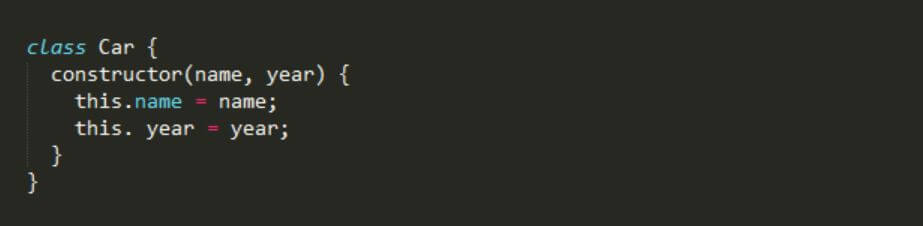
Class
In JavaScript, a class is a group of functions that belong to the same category. Objects in JavaScript can also be created with classes.
To create a new class, use the keyword class followed by a name for the new object.
Conditionals
Conditional statements allow you to execute different blocks of code depending on certain conditions.
The format for a conditional statement is if (condition) brackets. The condition is always evaluated as either true or false.
Scope
A scope is a location where variables can be accessed. For example, within the scope of a function, local variables can only be seen from inside that particular function.
However, outside of the function, those variables can still be referenced, but they must have parentheses around them.
Array
This is a data structure that holds lists of items. Each list item is called an element, and each element has its index number.
The indices start at 0 and go up until the last index is found.
Console
Within JavaScript, a built-in console allows us to write messages and see the output.
If we want to add additional information to our message, we can enclose this information within square brackets.
Easy Ways Kids Can Learn JavaScript
Kids are natural learners. They love technology and exploring the world around them. Teaching kids how to code is an excellent way to help nurture their natural curiosity.
The internet is brimming with ideas and tools to assist new developers in learning JavaScript. Below are some easy resources and tools kids can learn JavaScript from without a hassle.
Games And Apps
Learning about JavaScript doesn’t have to be difficult! There are lots of games, apps, and websites that make coding simple for beginners. Besides, JavaScript is a programming language used in game development, so learning through games or software like CodeCombat or CodeMonkey is a perfect fit.
Online or Direct Classes
More than ever, parents can use many different methods to teach kids how to code. If you are looking for more hands-on ways to teach kids how to code, consider taking them to an online or in-person JavaScript class.
Projects
Many children learn best by practical, so choosing a small JavaScript project they can undertake and master is a good alternative. When selecting a project, remember to consider your child’s past coding experience if they have any prior experience. Beginners should begin with a lesson that takes them through each step. Kids with some background can try a project with more general instructions.
Books
When it pertains to books that can teach JavaScript, there are several possibilities. Books not only teach coding ideas without additional screen time but are also easy to refer to repeatedly. This is also a good alternative for children who understand things better when delivered on a printed page rather than a screen.
JavaScript Libraries
JavaScript libraries are code snippets that have been prewritten for many uses. These libraries aid in the performance of the function, allowing for speedier development. Furthermore, it decreases the likelihood of a human mistake. The following JavaScript libraries are the popular types children should be family with as they learn the programming language.
Angular: It is a structural framework for dynamic web apps. It provides data-binding and change-detection features that allow you to use HTML as your template language. You can also extend HTML syntax to succinctly express your application’s components.
JQuery: JQuery is a fast and detailed JavaScript library. It carries out HTML document manipulation, and animation effects, etc., very simple with an intuitive API that works across many browsers.
Parsley: Parsley is another structured framework for developing rich interactive applications on the web. Similar to Angular, Parsley allows developers to use it as the programming language.
QUnit: QUnit is a powerful, easy-to-use, and well-maintained JavaScript unit testing framework. Such projects use QUnit as jQuery and jQuery UI.
Other includes:
React
Ember.js
Node.js
Conclusion
The web is a dynamic and ever-changing place. Users interact with each other and sites differently than they did a few years ago, and technology continues to advance.
There’s always something new to learn. Kids need opportunities that keep their skills relevant for the future. That’s where JavaScript comes in!
Our world today is undergoing a rapid technological change. Which raises a very important question for educators and school leaders – how can we prepare our next generation for all the technological surprises the future holds?
Stay Up To Date on The Latest NEWS AND LEARN MORE ABOUT CODING FOR KIDS.
We use cookies on our website to give you the most relevant experience by remembering your preferences and repeat visits. By clicking “Accept”, you consent to the use of ALL the cookies. However you may visit Cookie Settings to provide a controlled consent.
This website uses cookies to improve your experience while you navigate through the website. Out of these cookies, the cookies that are categorized as necessary are stored on your browser as they are essential for the working of basic functionalities of the website. We also use third-party cookies that help us analyze and understand how you use this website. These cookies will be stored in your browser only with your consent. You also have the option to opt-out of these cookies. But opting out of some of these cookies may have an effect on your browsing experience.
Necessary cookies are absolutely essential for the website to function properly. This category only includes cookies that ensures basic functionalities and security features of the website. These cookies do not store any personal information.
Cookie
Type
Duration
Description
_codemonkey_session_rails_4
1
1 year
_ga
persistent
2 years
This cookie is installed by Google Analytics. The cookie is used to calculate visitor, session, campaign data and keep track of site usage for the site's analytics report. The cookies store information anonymously and assign a randomly generated number to identify unique visitors.
cookielawinfo-checkbox-advertisement
persistent
11 months
The cookie is set by GDPR cookie consent to record the user consent for the cookies in the category "Advertisement".
cookielawinfo-checkbox-analytics
persistent
11 months
This cookies is set by GDPR Cookie Consent WordPress Plugin. The cookie is used to remember the user consent for the cookies under the category "Analytics".
cookielawinfo-checkbox-functional
persistent
11 months
cookielawinfo-checkbox-necessary
persistent
11 months
This cookie is set by GDPR Cookie Consent plugin. The cookies is used to store the user consent for the cookies in the category "Necessary".
cookielawinfo-checkbox-non-necessary
0
11 months
This cookie is set by GDPR Cookie Consent plugin. The cookies is used to store the user consent for the cookies in the category "Non Necessary".
cookielawinfo-checkbox-other
persistent
11 months
cookielawinfo-checkbox-performance
persistent
11 months
This cookie is used to keep track of which cookies the user have approved for this site.
JSESSIONID
1
1 year
Used by sites written in JSP. General purpose platform session cookies that are used to maintain users' state across page requests.
viewed_cookie_policy
persistent
1 hour
The cookie is set by the GDPR Cookie Consent plugin and is used to store whether or not user has consented to the use of cookies. It does not store any personal data.
XSRF-TOKEN
persistent
1 year
The cookie is set by Wix website building platform on Wix website. The cookie is used for security purposes.
Any cookies that may not be particularly necessary for the website to function and is used specifically to collect user personal data via analytics, ads, other embedded contents are termed as non-necessary cookies. It is mandatory to procure user consent prior to running these cookies on your website.
Cookie
Type
Duration
Description
rlas3
persistent
11 months
The cookie is set by rlcdn.com. The cookie is used to serve relevant ads to the visitor as well as limit the time the visitor sees an and also measure the effectiveness of the campaign.
UserMatchHistory
persistent
1 month
Linkedin - Used to track visitors on multiple websites, in order to present relevant advertisement based on the visitor's preferences.
This cookie is set by Google Analytics and is used to distinguish users and sessions. The cookie is created when the JavaScript library executes and there are no existing __utma cookies. The cookie is updated every time data is sent to Google Analytics.
__utmb
persistent
30 minutes
The cookie is set by Google Analytics. The cookie is used to determine new sessions/visits. The cookie is created when the JavaScript library executes and there are no existing __utma cookies. The cookie is updated every time data is sent to Google Analytics.
__utmc
persistent
1 year
The cookie is set by Google Analytics and is deleted when the user closes the browser. The cookie is not used by ga.js. The cookie is used to enable interoperability with urchin.js which is an older version of Google analytics and used in conjunction with the __utmb cookie to determine new sessions/visits.
__utmt
persistent
10 minutes
The cookie is set by Google Analytics and is used to throttle request rate.
__utmz
persistent
6 months
This cookie is set by Google analytics and is used to store the traffic source or campaign through which the visitor reached your site.
_gat
persistent
1 minute
This cookies is installed by Google Universal Analytics to throttle the request rate to limit the colllection of data on high traffic sites.
YSC
1
1 year
This cookies is set by Youtube and is used to track the views of embedded videos.
This cookie is used by Google Analytics to understand user interaction with the website.
_gid
persistent
1 day
This cookie is installed by Google Analytics. The cookie is used to store information of how visitors use a website and helps in creating an analytics report of how the wbsite is doing. The data collected including the number visitors, the source where they have come from, and the pages viisted in an anonymous form.
GPS
persistent
30 minutes
This cookie is set by Youtube and registers a unique ID for tracking users based on their geographical location
MR
persistent
5 months
This cookie is used to measure the use of the website for analytics purposes.
MUIDB
1
1 year
This cookie is used by MicroSoft and collects data about users of visits on multiple website. This data is used to analyze the efficiency of advertisements on websites.
This cookie is set by Facebook to deliver advertisement when they are on Facebook or a digital platform powered by Facebook advertising after visiting this website.
bscookie
1
2 years
This cookie is a browser ID cookie set by Linked share Buttons and ad tags.
fr
1
3 months
The cookie is set by Facebook to show relevant advertisments to the users and measure and improve the advertisements. The cookie also tracks the behavior of the user across the web on sites that have Facebook pixel or Facebook social plugin.
IDE
1
2 years
Used by Google DoubleClick and stores information about how the user uses the website and any other advertisement before visiting the website. This is used to present users with ads that are relevant to them according to the user profile.
MUID
persistent
1 year
Used by Microsoft as a unique identifier. The cookie is set by embedded Microsoft scripts. The purpose of this cookie is to synchronize the ID across many different Microsoft domains to enable user tracking.
pxrc
persistent
2 months
The purpose of the cookie is to identify a visitor to serve relevant advertisement.
rlas3
persistent
11 months
The cookie is set by rlcdn.com. The cookie is used to serve relevant ads to the visitor as well as limit the time the visitor sees an and also measure the effectiveness of the campaign.
skimCSP
persistent
11 months
This cookie is set by SkimResources. The cookie is used to record data on the visitor to optimize the relevance of the advretisements served to the users.
TapAd_DID
persistent
2 months
The cookie is set by tapad.com. The purpose of the cookie is to track users across devices to enable targeted advertising
TapAd_TS
persistent
2 months
The cookie is set by Tapad.com. The purpose of the cookie is to track users across devices to enable targeted advertising.
TDCPM
persistent
1 year
The cookie is set by CloudFare service to store a unique ID to identify a returning users device which then is used for targeted advertising.
TDID
persistent
1 year
The cookie is set by CloudFare service to store a unique ID to identify a returning users device which then is used for targeted advertising.
test_cookie
persistent
15 minutes
This cookie is set by doubleclick.net. The purpose of the cookie is to determine if the users' browser supports cookies.
VISITOR_INFO1_LIVE
1
5 months
This cookie is set by Youtube. Used to track the information of the embedded YouTube videos on a website.