Vitaly es el Gerente de Marketing Digital en CodeMonkey. Su maestría en Informática, combinada con su experiencia como padre de dos hijos, le permite crear contenido enfocado en la formación en programación.
Por qué aprender HTML puede ser bueno para el futuro de tu hijo
HTML is one of the most fundamental skills to learn in web design and development.
Learning HTML can be one of the best things your child does to better prepare themselves for future success.
Not only will they learn how to read, write and speak code, but many universities are now accepting HTML courses as college credits, too.
If you have a kid who you believe would excel in HTML, read on to learn more about what they can learn with their coding course and why they may want to consider learning HTML.
What is HTML?
HTML stands for Hypertext Markup Language. It is a computer language used to create websites and web pages. HTML is the foundation of webpages, and it is the building block of the internet.
Learning HTML can provide many benefits for your child. HTML provides an easy way to create visually appealing and functional websites. For those interested in developing their website or blog, learning HTML can be a great start.
It can also help give your child a competitive edge when it comes to applying for jobs in the tech industry or pursuing a career as a web developer. HTML is relatively easy to learn and can be picked up quickly by most people.
The syntax of HTML is fairly straightforward, so it is a good language to introduce to children as they learn basic coding concepts. There are also numerous tutorials available online that can help teach your child the basics of HTML.
With some dedication and practice, your child can create a professional-looking website in no time. In addition to helping your child build practical skills, learning HTML can also boost your child’s problem-solving abilities and improve their creativity. HTML requires you to think logically and troubleshoot any problems that arise.
By doing this, your child can develop critical thinking skills and become more adept at problem-solving. HTML also allows your child to explore their creative side as they develop their websites.
Learning HTML can open up new opportunities for your child and help them become a successful web developer. If your child is interested in technology or coding, then introducing them to HTML can be a great way to get them started.
With some patience and practice, your child can develop their skills in HTML and open up a world of possibilities.
What Are the Key Benefits of Your Child Learning HTML?
When providing your child with the best tools for success, it’s important to consider how technology can help them. One of the most beneficial computer skills a child can learn is Hypertext Markup Language (HTML).
HTML is a programming language used to create websites and web pages. It provides structure to content on the web, and its importance cannot be overstated.
Here are some reasons why learning HTML can be good for your child.
1. Basic computer knowledge has become crucial in today’s digital world.
2. HTML is one of the most powerful programming languages available; as such, mastering this skill will give children an advantage when applying for jobs or taking up courses in school to develop further skill sets
3. Today’s online society relies heavily on browsing through sites like Facebook, Twitter and YouTube, having a basic understanding of how they will help kids find information quickly and efficiently.
4. As more companies adopt e-commerce, having the skills to design their website becomes more necessary than ever. Using HTML may lead to higher pay rates and better opportunities.
5. HTML also helps kids to think critically and creatively. By learning how to create websites and webpages, kids can explore and develop their ideas and use the internet as a powerful tool for creativity.
6. Furthermore, coding with HTML is a great way for kids to express themselves. With HTML, kids can create unique designs and code their websites. This can be incredibly liberating for kids, who can learn to think outside the box and pursue their interests.
What Can Kids Do With HTML?
Web development is all about creativity and creating an aesthetically pleasing page. The point of HTML is to make a web page look attractive and well-organized. Children learning HTML can tap into their creative side and develop digital skills.
HTML is a great foundation for kids who want to pursue a career in development, as it opens up many opportunities to learn new coding languages and build upon their skills.
Additionally, HTML can lead to careers in diseño web, graphic design, and even user experience design. With so many beneficios, teaching kids HTML will give them a leg up in whichever field they choose to pursue.
Kids can become:
Software engineer
App Developer
Java Developer
Software Developer
Technical writer
Graphic designer
Computer programmer
Once you know HTML, the world is your oyster when building websites. You can create a website for anything you need without hiring someone else to do it for you. HTML is the foundation of the internet, so wherever you find the internet, you’ll find HTML too.
Most Commonly Used Tags in HTML
Most commonly used tags include those for headings, paragraphs, links, images, tables and lists. By having a basic understanding of these tags, children can gain an understanding of how websites are constructed and operated. In addition, introducing problem-solving and logic skills can help them better understand how computer programs work and think.
Let’s go through some of them:
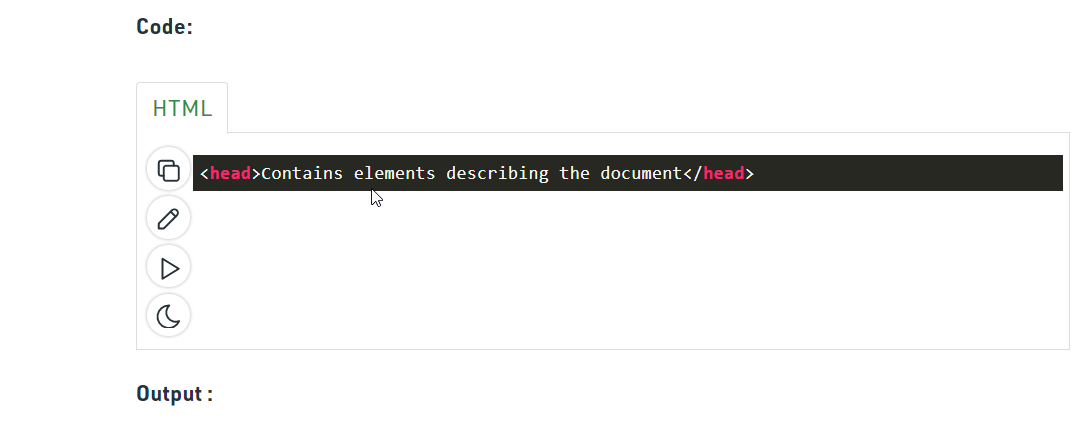
1. Head Tag: The head tag is the first element of an HTML document, containing information not displayed on the webpage. This tag stores meta-data, scripts, and titles for a webpage.
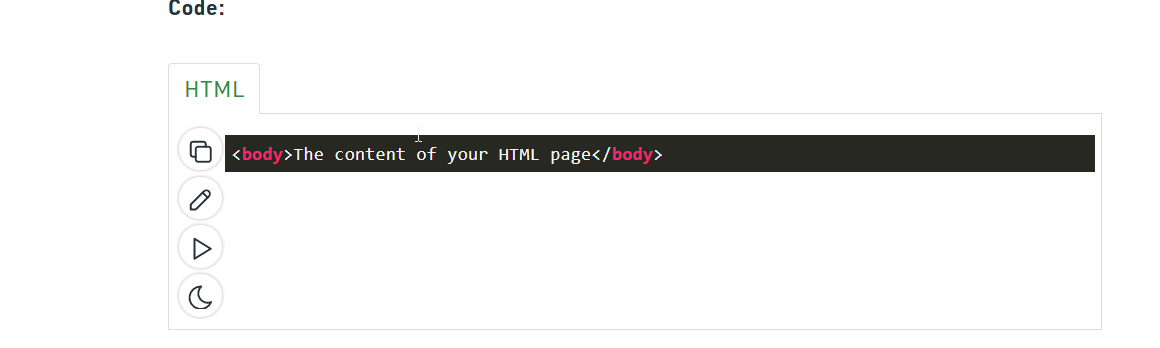
2. Body Tag: The body tag is the main section of an HTML document where all webpage content is written. It contains the text, images, videos and other information that a viewer will see when visiting a website.
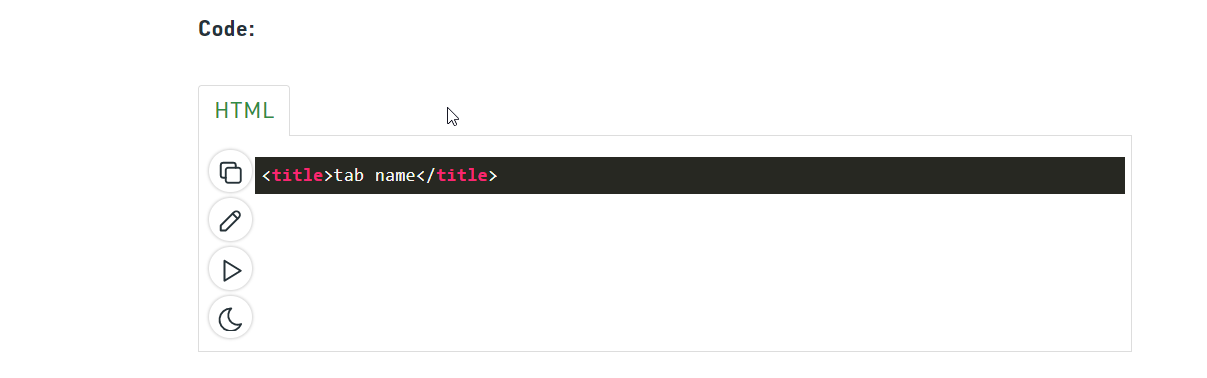
3. Title Tag: The title tag is placed in the head tag of an HTML document and sets the title of a webpage. It displays the page’s name in the browser tab and is often used as the main heading for search engine results.
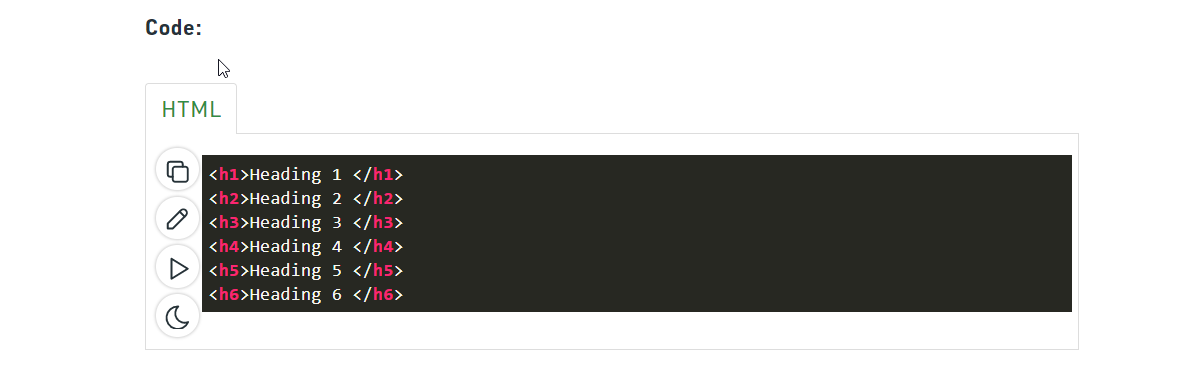
4. Heading Tag: Heading tags are used to create headings on a webpage and can be used to structure content into sections. They range from h1 (the largest) to h6 (the smallest).
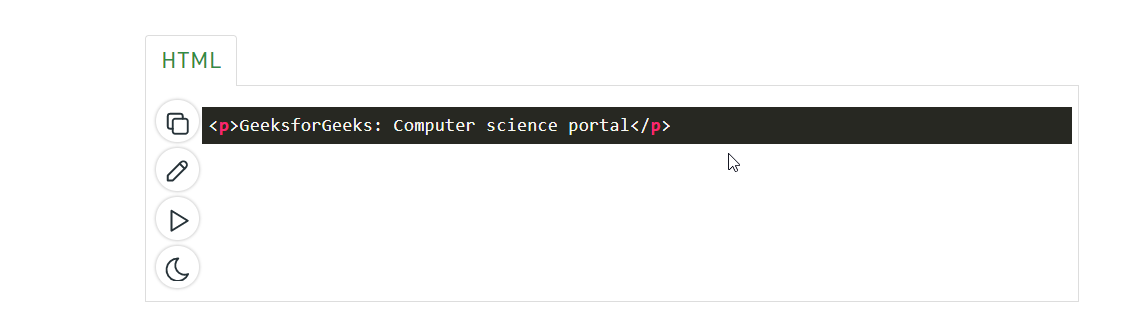
5. Paragraph Tag: The paragraph tag creates a separate line of text and helps break up a webpage into readable chunks. This tag adds space between paragraphs and sets the font size and style.
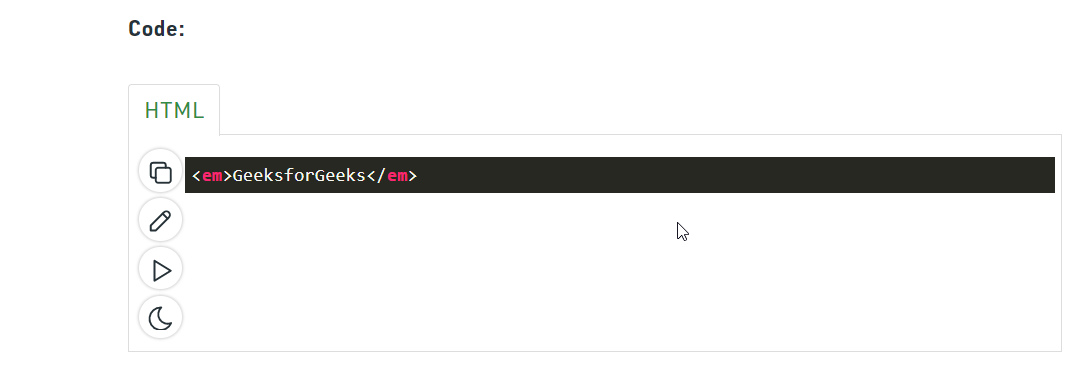
6. Emphasis Tag: The emphasis tag is used to emphasize words or phrases within a text. It stands out from the surrounding text by making it italicized, bolded or underlined.
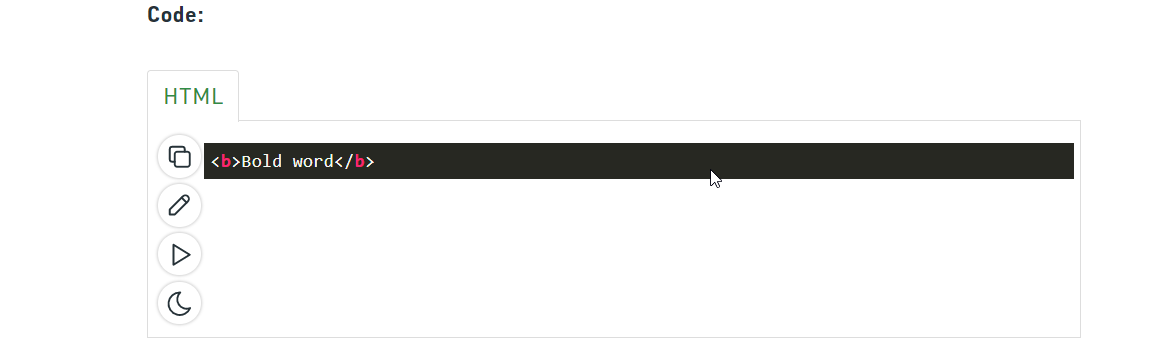
7. Bold Tag: The bold tag is used to make text appear bolder than regular text. It can be used to draw attention to words or phrases within a piece of text or simply to make text stand out from its surroundings.
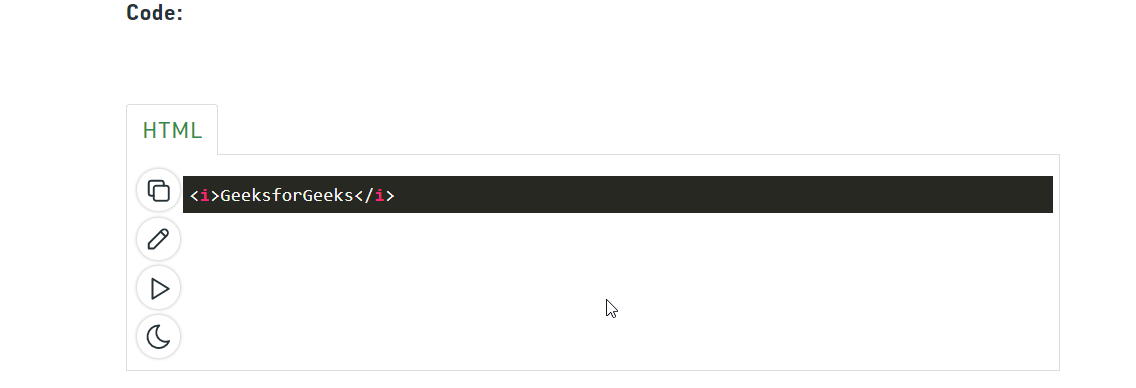
8. Italic Tag: The italic tag is used to make text appear italicized compared to regular text. It is often used for emphasis and can help draw attention to certain words or phrases within a sentence or paragraph.
What Age Can Kids Learn HTML?
HTML has become an increasingly important part of the digital landscape in recent years. It is the basic coding language used to create websites and webpages, so teaching children how to read, write and understand HTML can be a great advantage for their future. But how young is too young to start learning HTML?
Most experts agree that there is no set age when it is appropriate to start teaching a child HTML. Some experts suggest that children as young as six can begin learning basic HTML concepts, while others suggest waiting until they are at least 8.
The determining factor should depend on the child’s maturity level, interest in computers and ability to grasp the coding concept.
Elementary School
At the elementary school level, HTML can be an excellent way for kids to start developing basic coding skills. It can be used to help children understand how computers work and why specific instructions are followed. Even with fundamental knowledge of HTML, kids can create basic web pages. Additionally, HTML can be used to create animations and simple games. Finally, it allows kids to explore programming fundamentals and engage in creative problem-solving.
Middle School Students
Middle school is an ideal time to introduce more advanced concepts with HTML. At this level, students should begin to understand the language of coding and can become proficient with more complex tags. While creating websites is still viable, HTML can create more interactive content, such as web-based tools and apps. With guidance and instruction, middle schoolers can better understand coding, which will serve them well later.
High School Students
By high school, students should have a more comprehensive understanding of HTML, and it’s important to introduce more advanced concepts at this stage. Students should be able to create webpages easily, but they should also be proficient with more complex elements such as forms and images. Additionally, high schoolers should understand the basics of styling and how to develop custom websites. This will prepare them for more challenging projects and give them a leg up when entering the workforce.
Ways Kids Can Learn HTML
Kids of all ages can learn HTML, making it an excellent way to start them on their coding journey. But how can they learn? Here are some of the best and most accessible ways to familiarize kids with HTML.
Games and Apps
Learning HTML through games and apps is an excellent way to introduce it to young minds. This type of learning allows them to practice their skills and apply what they have learned in a fun and entertaining way. Plus, apps for tablets and phones are designed for people of all ages, so you’re sure to find something age-appropriate for your child.
Direct Coding Classes
Various coding classes are available for kids who want to learn HTML. These classes teach kids how to write HTML code, structure web pages, and use tools like WYSIWYG editors. If your child is interested in HTML, these classes can provide an excellent foundation for further exploration.
Projects
Kids can learn HTML by creating their own projects. Not only will this provide them with a creative outlet to express themselves, but it will also teach them the practical applications of HTML. For example, they could create a website or design a logo with HTML. Then, with guidance, they could turn this project into something special.
Tips for kids getting started with HTML
1. Prepare a text editor
In order to write an HMTL code you need some kind of a text editor. Almost every microsoft based computer comes with a Notepad Application, so you don’t need to download a special program to begin. You can type the HTML syntax in Notepad and save the document as a .html file.
2. Syntax
The syntax is very straightforward, since HTML is written in plain English with the exception of using tags enclosed in angle brackets, like <tag> to open and </tag> to close. One other thing you need to remember is always begin your document with the line <!DOCTYPE html> in order to view it later on.
3. Use basics at the beginning
<translate-press data-trp-translate-id="70555" data-trp-node-group="String List">Your first HTML project doesn’t have to be a complete super fancy website – you’re just learning! Begin with the basics (like </translate-press><head>, <title data-trp-translate-id-innertext="70557" data-trp-node-group-innertext="Meta Information" data-trp-node-description-innertext="Page Title">, and <body><translate-press data-trp-translate-id="70556" data-trp-node-group="String List"> for example) and then, when you’ll gain experience, do something more complex. Over time your HTML knowledge will expand and other programming languages will make more sense.</translate-press><script type='text/javascript' src='https://www.codemonkey.com/wp-includes/js/jquery/jquery.js'></script><script type='text/javascript' src='https://www.codemonkey.com/wp-content/plugins/translatepress-multilingual/assets/js/trp-iframe-preview-script.js'></script><link rel='stylesheet' id='trp-preview-iframe-style-css' href='https://www.codemonkey.com/wp-content/plugins/translatepress-multilingual/assets/css/trp-preview-iframe-style.css' type='text/css' media='all' /><link rel='stylesheet' id='dashicons-css' href='https://www.codemonkey.com/wp-includes/css/dashicons.min.css' type='text/css' media='all' />
4. Save your work
It seems obvious but we’re still going to mention it – save your work from time to time. Computers can crash, the power can go out – you can never know. Uploading your file into the cloud if you can and or saving a copy on an external hard disk is also a valid option. And remember – when saving, make sure that you have .html in the file name.
Conclusión
There is not a single job today that won’t be touched by AI or robotics. Kids who learn HTML now will have less competition when entering the workforce later in life because fewer people know HTML than there are now.
In the end, the decision to learn HTML and other coding languages is a personal one. However, if you are looking for ways to give your child an edge in their future career, teaching them the basics of coding could prove invaluable.
Whether they become a software engineer or tech-savvy user, knowing coding can open up many new opportunities in their future.
Manténgase al día sobre las últimas noticias Y MÁS INFORMACIÓN SOBRE CODIFICACIÓN PARA NIÑOS.
Usamos cookies en nuestro sitio web para brindarle la experiencia más relevante recordando sus preferencias y visitas. Al hacer clic en "Aceptar", acepta el uso de TODAS las cookies. Sin embargo, puede visitar la Configuración de cookies para proporcionar un consentimiento controlado.
Política de privacidad y cookies
Resumen de privacidad
Este sitio web utiliza cookies para mejorar su experiencia mientras navega por el sitio web. Fuera de estas cookies, las cookies que se clasifican como necesarias se almacenan en su navegador, ya que son esenciales para el funcionamiento de las funcionalidades básicas del sitio web. También utilizamos cookies de terceros que nos ayudan a analizar y comprender cómo utiliza este sitio web. Estas cookies se almacenarán en su navegador solo con su consentimiento. También tiene la opción de optar por no recibir estas cookies. Pero la exclusión voluntaria de algunas de estas cookies puede afectar su experiencia de navegación.
Las cookies necesarias son absolutamente esenciales para que el sitio web funcione correctamente. Esta categoría solo incluye cookies que garantizan funcionalidades básicas y características de seguridad del sitio web. Estas cookies no almacenan ninguna información personal.
Galleta
Tipo
Duración
Descripción
_codemonkey_session_rails_4
1
1 año
_Georgia
persistente
2 años
Esta cookie es instalada por Google Analytics. La cookie se utiliza para calcular los datos de visitantes, sesiones y campañas y realizar un seguimiento del uso del sitio para el informe de análisis del sitio. Las cookies almacenan información de forma anónima y asignan un número generado aleatoriamente para identificar visitantes únicos.
cookielawinfo-checkbox-publicidad
persistente
11 meses
La cookie se establece mediante el consentimiento de cookies del RGPD para registrar el consentimiento del usuario para las cookies en la categoría "Publicidad".
cookielawinfo-checkbox-analytics
persistente
11 meses
Estas cookies están establecidas por el complemento de WordPress de consentimiento de cookies de GDPR. La cookie se utiliza para recordar el consentimiento del usuario para las cookies en la categoría "Análisis".
cookielawinfo-checkbox-funcional
persistente
11 meses
cookielawinfo-checkbox-required
persistente
11 meses
Esta cookie está configurada por el complemento de consentimiento de cookies de GDPR. Las cookies se utilizan para almacenar el consentimiento del usuario para las cookies en la categoría "Necesarias".
cookielawinfo-checkbox-no necesario
0
11 meses
Esta cookie está configurada por el complemento de consentimiento de cookies de GDPR. Las cookies se utilizan para almacenar el consentimiento del usuario para las cookies en la categoría "No necesarias".
cookielawinfo-checkbox-otro
persistente
11 meses
cookielawinfo-checkbox-performance
persistente
11 meses
Esta cookie se utiliza para realizar un seguimiento de las cookies que el usuario ha aprobado para este sitio.
JSESSIONID
1
1 año
Utilizado por sitios escritos en JSP. Cookies de sesión de plataforma de propósito general que se utilizan para mantener el estado de los usuarios en las solicitudes de página.
view_cookie_policy
persistente
1 hora
La cookie está configurada por el complemento de consentimiento de cookies de GDPR y se utiliza para almacenar si el usuario ha dado su consentimiento o no para el uso de cookies. No almacena ningún dato personal.
XSRF-TOKEN
persistente
1 año
La cookie la establece la plataforma de creación de sitios web de Wix en el sitio web de Wix. La cookie se utiliza con fines de seguridad.
Las cookies que pueden no ser particularmente necesarias para que el sitio web funcione y se utilizan específicamente para recopilar datos personales del usuario a través de análisis, anuncios y otros contenidos integrados se denominan cookies no necesarias. Es obligatorio obtener el consentimiento del usuario antes de ejecutar estas cookies en su sitio web.
Galleta
Tipo
Duración
Descripción
rlas3
persistente
11 meses
La cookie la establece rlcdn.com. La cookie se utiliza para mostrar anuncios relevantes al visitante, así como para limitar el tiempo que el visitante ve una y también para medir la efectividad de la campaña.
UserMatchHistory
persistente
1 mes
Linkedin: se utiliza para rastrear a los visitantes en múltiples sitios web, con el fin de presentar anuncios relevantes según las preferencias del visitante.
Google Analytics establece esta cookie y se utiliza para distinguir usuarios y sesiones. La cookie se crea cuando se ejecuta la biblioteca JavaScript y no existen cookies __utma. La cookie se actualiza cada vez que se envían datos a Google Analytics.
__utmb
persistente
30 minutos
Google Analytics establece la cookie. La cookie se utiliza para determinar nuevas sesiones / visitas. La cookie se crea cuando se ejecuta la biblioteca JavaScript y no existen cookies __utma. La cookie se actualiza cada vez que se envían datos a Google Analytics.
__utmc
persistente
1 año
Google Analytics establece la cookie y se elimina cuando el usuario cierra el navegador. La cookie no es utilizada por ga.js. La cookie se utiliza para permitir la interoperabilidad con urchin.js, que es una versión anterior de Google Analytics y se utiliza junto con la cookie __utmb para determinar nuevas sesiones / visitas.
__utmt
persistente
10 minutos
Google Analytics establece la cookie y se utiliza para acelerar la tasa de solicitud.
__utmz
persistente
6 meses
Google Analytics establece esta cookie y se utiliza para almacenar la fuente de tráfico o la campaña a través de la cual el visitante llegó a su sitio.
_revólver
persistente
1 minuto
Google Universal Analytics instala estas cookies para acelerar la tasa de solicitud y limitar la recopilación de datos en sitios de alto tráfico.
YSC
1
1 año
Estas cookies son establecidas por Youtube y se utilizan para rastrear las vistas de videos incrustados.
Google Analytics utiliza esta cookie para comprender la interacción del usuario con el sitio web.
_gid
persistente
1 día
Esta cookie es instalada por Google Analytics. La cookie se utiliza para almacenar información sobre cómo los visitantes usan un sitio web y ayuda a crear un informe analítico de cómo está funcionando el sitio web. Los datos recopilados, incluido el número de visitantes, la fuente de donde provienen y las páginas, se muestran de forma anónima.
GPS
persistente
30 minutos
Esta cookie la establece Youtube y registra una identificación única para rastrear a los usuarios según su ubicación geográfica.
SEÑOR
persistente
5 meses
Esta cookie se utiliza para medir el uso del sitio web con fines analíticos.
MUIDB
1
1 año
MicroSoft utiliza esta cookie y recopila datos sobre los usuarios que visitan varios sitios web. Estos datos se utilizan para analizar la eficacia de los anuncios en sitios web.
Facebook establece esta cookie para entregar publicidad cuando están en Facebook o en una plataforma digital impulsada por publicidad de Facebook después de visitar este sitio web.
bscookie
1
2 años
Esta cookie es una cookie de identificación del navegador establecida por los botones de compartir vinculados y las etiquetas publicitarias.
fr
1
3 meses
Facebook configura la cookie para mostrar anuncios relevantes a los usuarios y medir y mejorar los anuncios. La cookie también rastrea el comportamiento del usuario en la web en sitios que tienen píxeles de Facebook o complementos sociales de Facebook.
IDE
1
2 años
Utilizado por Google DoubleClick y almacena información sobre cómo el usuario utiliza el sitio web y cualquier otro anuncio antes de visitar el sitio web. Se utiliza para presentar a los usuarios anuncios que son relevantes para ellos de acuerdo con el perfil del usuario.
MUID
persistente
1 año
Usado por Microsoft como identificador único. La cookie se establece mediante scripts integrados de Microsoft. El propósito de esta cookie es sincronizar la identificación en muchos dominios de Microsoft diferentes para permitir el seguimiento de usuarios.
pxrc
persistente
2 meses
El propósito de la cookie es identificar a un visitante para ofrecer publicidad relevante.
rlas3
persistente
11 meses
La cookie la establece rlcdn.com. La cookie se utiliza para mostrar anuncios relevantes al visitante, así como para limitar el tiempo que el visitante ve una y también para medir la efectividad de la campaña.
skimCSP
persistente
11 meses
SkimResources establece esta cookie. La cookie se utiliza para registrar datos sobre el visitante con el fin de optimizar la relevancia de las ventajas que se ofrecen a los usuarios.
TapAd_DID
persistente
2 meses
La cookie la coloca tapad.com. El propósito de la cookie es rastrear a los usuarios en todos los dispositivos para permitir publicidad dirigida
TapAd_TS
persistente
2 meses
Tapad.com establece la cookie. El propósito de la cookie es rastrear a los usuarios en todos los dispositivos para permitir publicidad dirigida.
TDCPM
persistente
1 año
El servicio CloudFare configura la cookie para almacenar una identificación única para identificar un dispositivo de usuarios recurrentes que luego se utiliza para publicidad dirigida.
TDID
persistente
1 año
El servicio CloudFare configura la cookie para almacenar una identificación única para identificar un dispositivo de usuarios recurrentes que luego se utiliza para publicidad dirigida.
test_cookie
persistente
15 minutos
Esta cookie la establece doubleclick.net. El propósito de la cookie es determinar si el navegador de los usuarios admite cookies.
VISITOR_INFO1_LIVE
1
5 meses
Youtube establece esta cookie. Se utiliza para rastrear la información de los videos de YouTube incrustados en un sitio web.
Esta cookie está configurada por linkedIn. El propósito de la cookie es habilitar las funcionalidades de LinkedIn en la página.
lang
persistente
1 año
Esta cookie se utiliza para almacenar las preferencias de idioma de un usuario para ofrecer contenido en ese idioma almacenado la próxima vez que el usuario visite el sitio web.
lidc
persistente
1 día
LinkedIn establece esta cookie y la utiliza para el enrutamiento.