Виталий — менеджер по цифровому маркетингу в CodeMonkey. Его степень магистра компьютерных наук в сочетании с опытом отца двух сыновей помогает ему создавать контент, ориентированный на обучение кодированию.
Категории блога
Отмеченная наградами программа по кодированию для детей
JavaScript for Kids: What is it and where to start
JavaScript is a powerful programming language for creating interactive websites and web applications.
Brendan Eich originally developed JavaScript in 1995, but it wasn’t until ten years later that it became widely used.
However, JavaScript can be tough to learn for kids. That’s why we’ve put together this guide on how to teach JavaScript to kids.
With this guide, you’ll learn basic tips on introducing JavaScript to kids and more advanced concepts they can use to create their web projects.
By the end of this guide, you’ll have a strong foundation of what Javascript entails, why kids should invest their time into learning this programming language, and how it can benefit them in our world today.
So let’s get started!
What is JavaScript?
JavaScript is a programming language used on the client side of web applications. It allows developers to write code that performs actions and interacts with the user without reloading the page.
JavaScript can be used for basic tasks like changing the color of an element, but it can also be combined with other languages, such as HTML and CSS, to create more complex effects and animations.
JavaScript can add text dynamically, create interactive content by manipulating elements on the screen and update information in real time.
The syntax includes curly brackets and semicolons, which must be present after every line to execute the program correctly.
Simply put, JavaScript is most typically employed to enhance the interactivity of web pages and applications.
Why Should Kids Learn JavaScript
There are numerous reasons children should learn to write in JavaScript, but most have nothing to do with your child’s eventual job choice.
While studying JavaScript can surely spark an interest that could lead to a career, there are numerous reasons your child should learn JavaScript, but highlighted below are a few things they benefit from.
Решение проблем
Learning to think logically and solve problems will help them not only on tests but also in life as they grow up. They’ll be able to come up with creative solutions to challenges they may face, which is invaluable later in life. It’s important to note that problem-solving isn’t just about math and logic- it helps with empathy toward others.
Logical Reasoning
Programming teaches logic, one of the most important skills a child should have today. With so many social media and video games at their fingertips, it is up to them to analyze and make decisions based on what they see before them. Learning JavaScript will prepare your child and improve their thinking faculty.
Целеустремлённость
Learning to code with JavaScript will encourage your child to try new things, be persistent and keep going even when it’s tough. Yes, this is because, at one point in time, they will be pushed against the wall with challenges when learning to code, which teaches them perseverance without knowing it.
Веб-разработка
If your kid already has some background in coding, JavaScript provides them with a valuable tool, particularly for web development. Everyone ignores a static website eventually because it becomes boring. JavaScript enables children to develop interactive websites that are more appealing to visitors and more enjoyable to create.
Teaching children how to program websites opens them to a world of possibilities, such as helping people find employment or building their brand.
What Age Can Kids Learn JavaScript?
Children as young as eight years can begin learning JavaScript. Coding is like learning a second language; studies have shown that younger children are more proficient at learning new languages.
Because this is a text-based programming language, typing abilities are essential. If your kid has good typing abilities, JavaScript is an excellent language to learn.
If kids have difficulty typing, визуальное программирование may be a better option to begin their coding career.
Elementary School Students
When teaching coding to elementary school students, it’s critical to focus on the fundamentals of JavaScript, such as variables, loops, and functions. The syntax is highly relevant for this age range because they have to understand the rules for accurately typing JavaScript. Children aged 8-10 may use JavaScript basics to construct animated games or interactive web pages.
Middle School Students
As they mature into middle school, they can move to more advanced topics, such as how to create GUIs (graphical user interfaces) using JavaFX. Basic HTML skills will also come in handy, so teaching them both HTML and JavaScript in tandem will be great. One great way to do this would be by having them build a basic website from scratch.
High School Students
In addition to learning the principles of JavaScript, high school students may begin to use libraries like jQuery to make games and webpages more interactive without having to code everything from scratch. Children in high school can also learn about APIs, allowing applications to communicate with one another.
Common JavaScript Terms
Есть several terminologies and unique words in JavaScript. Learning these terms will assist your youngster in expanding and understanding the JavaScript framework.
When first learning JavaScript, children should be exposed to the following terms:
Script
A script is a word used to refer to an instruction or set of instructions. Scripts are commonly used in JavaScript programming, although scripts can be written in many other computer languages.
A script can contain any combination of text and executable code.
Функции
These are blocks of code that execute a specific task. The name of the function specifies what tasks it performs.
Parentheses () after the function’s name indicate that one or more parameters (including data types, numbers, and strings) need to be provided for the function to execute successfully.
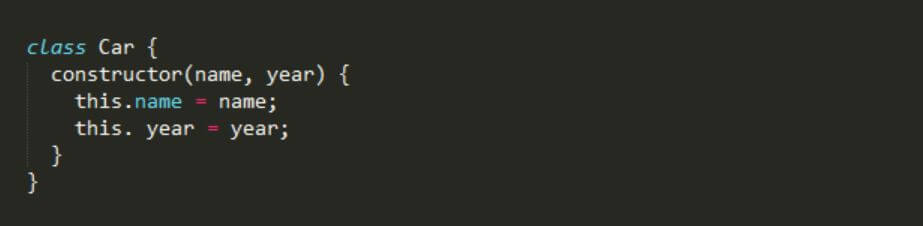
Class
In JavaScript, a class is a group of functions that belong to the same category. Objects in JavaScript can also be created with classes.
To create a new class, use the keyword class followed by a name for the new object.
Условные
Conditional statements allow you to execute different blocks of code depending on certain conditions.
The format for a conditional statement is if (condition) brackets. The condition is always evaluated as either true or false.
Scope
A scope is a location where variables can be accessed. For example, within the scope of a function, local variables can only be seen from inside that particular function.
However, outside of the function, those variables can still be referenced, but they must have parentheses around them.
Array
This is a data structure that holds lists of items. Each list item is called an element, and each element has its index number.
The indices start at 0 and go up until the last index is found.
Console
Within JavaScript, a built-in console allows us to write messages and see the output.
If we want to add additional information to our message, we can enclose this information within square brackets.
Easy Ways Kids Can Learn JavaScript
Kids are natural learners. They love technology and exploring the world around them. Teaching kids how to code is an excellent way to help nurture their natural curiosity.
The internet is brimming with ideas and tools to assist new developers in learning JavaScript. Below are some easy resources and tools kids can learn JavaScript from without a hassle.
Games And Apps
Learning about JavaScript doesn’t have to be difficult! There are lots of games, apps, and websites that make coding simple for beginners. Besides, JavaScript is a programming language used in game development, so learning through games or software like CodeCombat or CodeMonkey is a perfect fit.
Online or Direct Classes
More than ever, parents can use many different methods to teach kids how to code. If you are looking for more hands-on ways to teach kids how to code, consider taking them to an online or in-person JavaScript class.
Projects
Many children learn best by practical, so choosing a small JavaScript project they can undertake and master is a good alternative. When selecting a project, remember to consider your child’s past coding experience if they have any prior experience. Beginners should begin with a lesson that takes them through each step. Kids with some background can try a project with more general instructions.
Книги
When it pertains to books that can teach JavaScript, there are several possibilities. Books not only teach coding ideas without additional screen time but are also easy to refer to repeatedly. This is also a good alternative for children who understand things better when delivered on a printed page rather than a screen.
JavaScript Libraries
JavaScript libraries are code snippets that have been prewritten for many uses. These libraries aid in the performance of the function, allowing for speedier development. Furthermore, it decreases the likelihood of a human mistake. The following JavaScript libraries are the popular types children should be family with as they learn the programming language.
Angular: It is a structural framework for dynamic web apps. It provides data-binding and change-detection features that allow you to use HTML as your template language. You can also extend HTML syntax to succinctly express your application’s components.
JQuery: JQuery is a fast and detailed JavaScript library. It carries out HTML document manipulation, and animation effects, etc., very simple with an intuitive API that works across many browsers.
Parsley: Parsley is another structured framework for developing rich interactive applications on the web. Similar to Angular, Parsley allows developers to use it as the programming language.
QUnit: QUnit is a powerful, easy-to-use, and well-maintained JavaScript unit testing framework. Such projects use QUnit as jQuery and jQuery UI.
Other includes:
React
Ember.js
Node.js
Заключение
The web is a dynamic and ever-changing place. Users interact with each other and sites differently than they did a few years ago, and technology continues to advance.
There’s always something new to learn. Kids need opportunities that keep their skills relevant for the future. That’s where JavaScript comes in!
Сегодня наш мир переживает стремительные технологические изменения. Это поднимает очень важный вопрос для педагогов и руководителей школ: как мы можем подготовить наше следующее поколение ко всем технологическим сюрпризам, которые сулит будущее?
Будьте в курсе последних новостей И УЗНАЙТЕ БОЛЬШЕ О КОДИРОВКЕ ДЛЯ ДЕТЕЙ.
Мы используем файлы cookie на нашем веб-сайте, чтобы предоставить вам наиболее релевантный опыт, запоминая ваши предпочтения и повторные посещения. Нажимая «Принять», вы соглашаетесь на использование ВСЕХ файлов cookie. Однако вы можете посетить Настройки файлов cookie, чтобы предоставить контролируемое согласие.
Политика конфиденциальности и использования файлов cookie
Обзор конфиденциальности
Этот веб-сайт использует файлы cookie для улучшения вашего опыта при навигации по веб-сайту. Из этих файлов cookie файлы cookie, которые классифицируются как необходимые, хранятся в вашем браузере, поскольку они необходимы для работы основных функций веб-сайта. Мы также используем сторонние файлы cookie, которые помогают нам анализировать и понимать, как вы используете этот веб-сайт. Эти файлы cookie будут храниться в вашем браузере только с вашего согласия. У вас также есть возможность отказаться от этих файлов cookie. Но отказ от некоторых из этих файлов cookie может повлиять на ваш опыт просмотра.
Необходимые файлы cookie абсолютно необходимы для правильной работы веб-сайта. В эту категорию входят только файлы cookie, которые обеспечивают базовые функции и функции безопасности веб-сайта. Эти файлы cookie не хранят никакой личной информации.
Cookie-файлы
Тип
Продолжительность
Описание
_codemonkey_session_rails_4
1
1 год
_ga
настойчивый
2 года
Этот файл cookie устанавливается Google Analytics. Файл cookie используется для расчета данных о посетителях, сеансах и кампании, а также для отслеживания использования сайта в аналитическом отчете. Файлы cookie хранят информацию анонимно и присваивают случайно сгенерированный номер для идентификации уникальных посетителей.
Cookielawinfo-checkbox-реклама
настойчивый
11 месяцев
Файл cookie устанавливается в соответствии с GDPR, чтобы записать согласие пользователя на использование файлов cookie в категории «Реклама».
Cookielawinfo-checkbox-analytics
настойчивый
11 месяцев
Эти файлы cookie устанавливаются плагином GDPR Cookie Consent WordPress. Файл cookie используется для запоминания согласия пользователя на использование файлов cookie в категории «Аналитика».
Cookielawinfo-checkbox-функциональный
настойчивый
11 месяцев
Cookielawinfo-checkbox-необходимо
настойчивый
11 месяцев
Этот файл cookie устанавливается подключаемым модулем GDPR Cookie Consent. Файлы cookie используются для хранения согласия пользователя на файлы cookie в категории «Необходимые».
Cookielawinfo-checkbox-не обязательно
0
11 месяцев
Этот файл cookie устанавливается подключаемым модулем GDPR Cookie Consent. Файлы cookie используются для хранения согласия пользователя на файлы cookie в категории «Необязательно».
Cookielawinfo-checkbox-другое
настойчивый
11 месяцев
Cookielawinfo-checkbox-performance
настойчивый
11 месяцев
Этот файл cookie используется для отслеживания того, какие файлы cookie пользователь одобрил для этого сайта.
JSESSIONID
1
1 год
Используется сайтами, написанными на JSP. Файлы cookie сеанса платформы общего назначения, которые используются для поддержания состояния пользователей при запросах страниц.
View_cookie_policy
настойчивый
1 час
Файл cookie устанавливается подключаемым модулем GDPR Cookie Consent и используется для хранения информации о том, согласился ли пользователь на использование файлов cookie. Он не хранит никаких личных данных.
XSRF-ТОКЕН
настойчивый
1 год
Файл cookie устанавливается платформой для создания веб-сайтов Wix на веб-сайте Wix. Файл cookie используется в целях безопасности.
Любые файлы cookie, которые могут не быть особенно необходимыми для работы веб-сайта и используются специально для сбора личных данных пользователей с помощью аналитики, рекламы и другого встроенного содержимого, называются ненужными файлами cookie. Перед запуском этих файлов cookie на вашем веб-сайте необходимо получить согласие пользователя.
Cookie-файлы
Тип
Продолжительность
Описание
rlas3
настойчивый
11 месяцев
Файл cookie устанавливается rlcdn.com. Файл cookie используется для показа посетителю релевантной рекламы, а также для ограничения времени, в течение которого посетитель видит ее, а также для измерения эффективности кампании.
UserMatchHistory
настойчивый
1 месяц
Linkedin - используется для отслеживания посетителей на нескольких веб-сайтах с целью представления релевантной рекламы на основе предпочтений посетителя.
Этот файл cookie устанавливается Google Analytics и используется для различения пользователей и сеансов. Файл cookie создается при выполнении библиотеки JavaScript и отсутствии существующих файлов cookie __utma. Файл cookie обновляется каждый раз, когда данные отправляются в Google Analytics.
__utmb
настойчивый
30 минут
Файл cookie устанавливается Google Analytics. Файл cookie используется для определения новых сеансов / посещений. Файл cookie создается при выполнении библиотеки JavaScript и отсутствии существующих файлов cookie __utma. Файл cookie обновляется каждый раз, когда данные отправляются в Google Analytics.
__utmc
настойчивый
1 год
Файл cookie устанавливается Google Analytics и удаляется, когда пользователь закрывает браузер. Файл cookie не используется ga.js. Файл cookie используется для обеспечения взаимодействия с urchin.js, который представляет собой более старую версию Google Analytics, и используется вместе с файлом cookie __utmb для определения новых сеансов / посещений.
__utmt
настойчивый
10 минут
Файл cookie устанавливается Google Analytics и используется для регулирования частоты запросов.
__utmz
настойчивый
6 месяцев
Этот файл cookie устанавливается Google Analytics и используется для хранения источника трафика или кампании, с помощью которой посетитель перешел на ваш сайт.
_gat
настойчивый
1 минута
Эти файлы cookie устанавливаются Google Universal Analytics, чтобы ограничить частоту запросов и ограничить сбор данных на сайтах с высокой посещаемостью.
YSC
1
1 год
Эти файлы cookie устанавливаются Youtube и используются для отслеживания просмотров встроенных видео.
Этот файл cookie используется Google Analytics для понимания взаимодействия пользователя с веб-сайтом.
_gid
настойчивый
1 день
Этот файл cookie устанавливается Google Analytics. Файл cookie используется для хранения информации о том, как посетители используют веб-сайт, и помогает в создании аналитического отчета о том, как работает веб-сайт. Собранные данные, включая количество посетителей, источник, откуда они пришли, и просмотренные страницы в анонимной форме.
GPS
настойчивый
30 минут
Этот файл cookie устанавливается Youtube и регистрирует уникальный идентификатор для отслеживания пользователей в зависимости от их географического положения.
MR
настойчивый
5 месяцев
Этот файл cookie используется для измерения использования веб-сайта в аналитических целях.
MUIDB
1
1 год
Этот файл cookie используется MicroSoft и собирает данные о пользователях, посещающих несколько веб-сайтов. Эти данные используются для анализа эффективности рекламы на веб-сайтах.
Этот файл cookie устанавливается Facebook для показа рекламы, когда они находятся на Facebook или на цифровой платформе, основанной на рекламе Facebook после посещения этого веб-сайта.
bscookie
1
2 года
Этот файл cookie представляет собой файл cookie идентификатора браузера, установленный кнопками Linked share и рекламными тегами.
fr
1
3 месяца
Файл cookie устанавливается Facebook, чтобы показывать пользователям релевантную рекламу, а также оценивать и улучшать рекламу. Файл cookie также отслеживает поведение пользователя в Интернете на сайтах, на которых есть пиксель Facebook или социальный плагин Facebook.
IDE
1
2 года
Используется Google DoubleClick и хранит информацию о том, как пользователь использует веб-сайт, и любую другую рекламу перед посещением веб-сайта. Это используется для показа пользователям релевантной для них рекламы в соответствии с профилем пользователя.
MUID
настойчивый
1 год
Используется Microsoft как уникальный идентификатор. Файл cookie устанавливается встроенными скриптами Microsoft. Целью этого файла cookie является синхронизация идентификатора во многих различных доменах Microsoft для обеспечения возможности отслеживания пользователей.
pxrc
настойчивый
2 месяца
Целью файлов cookie является идентификация посетителя для показа соответствующей рекламы.
rlas3
настойчивый
11 месяцев
Файл cookie устанавливается rlcdn.com. Файл cookie используется для показа посетителю релевантной рекламы, а также для ограничения времени, в течение которого посетитель видит ее, а также для измерения эффективности кампании.
skimCSP
настойчивый
11 месяцев
Этот файл cookie устанавливается SkimResources. Файл cookie используется для записи данных о посетителе, чтобы оптимизировать релевантность рекомендаций, предоставляемых пользователям.
TapAd_DID
настойчивый
2 месяца
Файл cookie устанавливается сайтом tapad.com. Цель файлов cookie - отслеживать пользователей на разных устройствах для включения таргетированной рекламы.
TapAd_TS
настойчивый
2 месяца
Файл cookie устанавливается Tapad.com. Целью файлов cookie является отслеживание пользователей на разных устройствах для включения таргетированной рекламы.
TDCPM
настойчивый
1 год
Файл cookie устанавливается службой CloudFare для хранения уникального идентификатора устройства возвращающегося пользователя, который затем используется для целевой рекламы.
TDID
настойчивый
1 год
Файл cookie устанавливается службой CloudFare для хранения уникального идентификатора устройства возвращающегося пользователя, который затем используется для целевой рекламы.
test_cookie
настойчивый
15 минут
Этот файл cookie устанавливается doubleclick.net. Цель файлов cookie - определить, поддерживает ли браузер пользователя файлы cookie.
VISITOR_INFO1_LIVE
1
5 месяцев
Этот файл cookie установлен Youtube. Используется для отслеживания информации о встроенных видео YouTube на веб-сайте.
Этот файл cookie устанавливается LinkedIn. Целью файлов cookie является включение функций LinkedIn на странице.
язык
настойчивый
1 год
Этот файл cookie используется для хранения языковых предпочтений пользователя для предоставления контента на этом сохраненном языке при следующем посещении пользователем веб-сайта.
lidc
настойчивый
1 день
Этот файл cookie устанавливается LinkedIn и используется для маршрутизации.