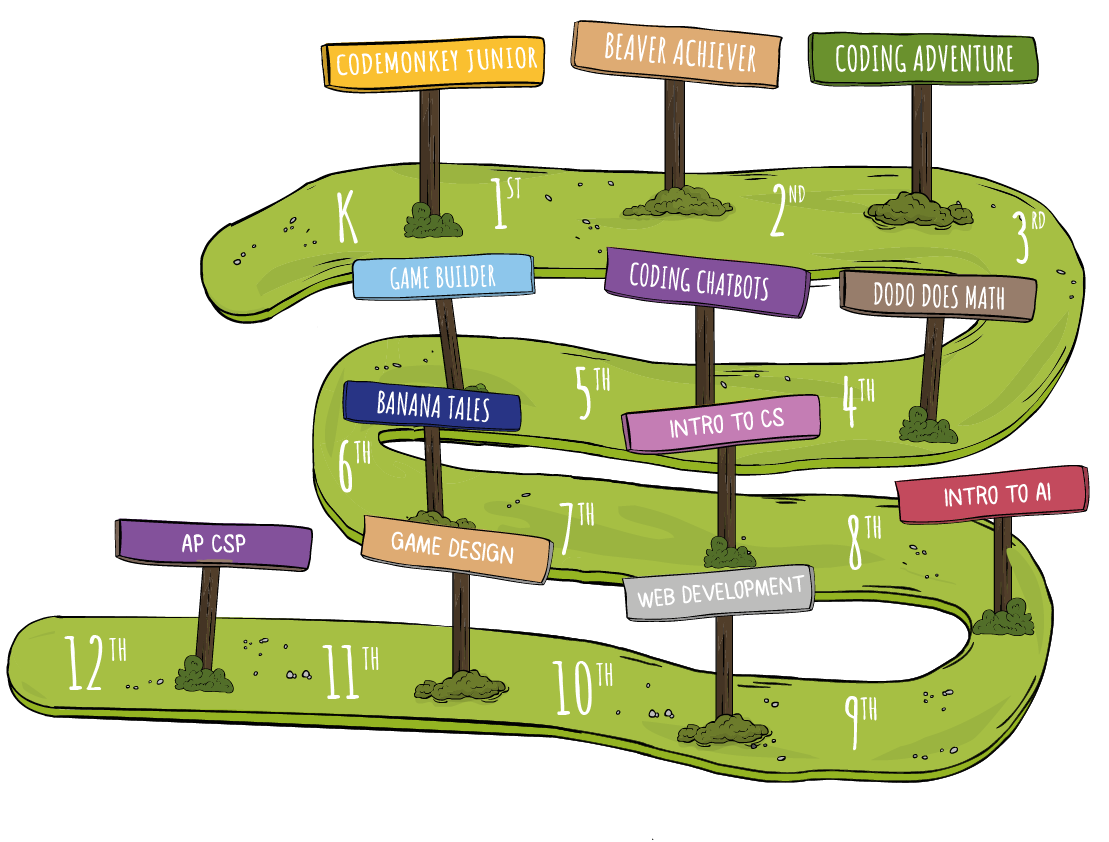
CodeMonkey offers educational resources suitable for different grades and experience levels

CodeMonkey Jr. is for your youngest learners. This app teaches kindergarteners the basics of coding with a progression of gaming challenges. Using blocks, students will build a set of visual coding instructions to help lead a monkey to a treasure chest.
Grades / Min Age: PreK-1st (4+)
Challenges: 120, divided into 4 courses.
Lessons: 29, 35min each; 2 semesters. Includes videos.
Devices: Desktops/laptops/tablets/iPads
Prior Experience: None
Programming Language: Blocks


Beaver Achiever is great for stimulating young students to learn essential coding skills. Your students will use coding blocks to help the friendly beaver complete different tasks in its natural habitat.
Grades / Min Age: 1st-2nd (6+)
Challenges: 115 challenges. Includes quizzes.
Lessons: 23, 45 min each; 4.5 months / taught 1x per week.
Devices: Desktops/laptops/tablets/iPads.
Prior Experience: None
Programming Language: Blocks
 .
.
Dodo Does Math’s highly engaging challenges offer students a memorable way to practice math as they code in CoffeeScript. In each challenge, students need to help the dodo get to her eggs by utilizing real-world coding and math skills.
Grades / Min Age: 3rd-5th (8+)
Challenges: 60, divided into 3 courses.
Lessons: 9 all together (3 for each course).
Devices: Desktops/laptops/tablets/iPads
Prior Experience: First 30 Coding Adventure challenges.
Programming Language: CoffeeScript


Coding Adventure is a game-based environment where students learn to code in CoffeeScript as they help a monkey catch bananas. The course provides an easy entry into text-based coding.
Grades / Min Age: 3rd-5th (8+)
Challenges: 210 challenges; additional 210 practice challenges. Includes quizzes.
Lessons: 48, 45 min each; 3 semesters / taught 1x per week. Includes videos.
Devices: Desktops/laptops//irst 175 can be played on tablets/iPads
Prior Experience: None
Programming Language: CoffeeScript
After completing CodeMonkey’s award-winning coding courses, students will be able to navigate through the programming world with a sense of confidence and accomplishment!
Digital literacy courses will introduce students to the different aspects of computers and how to use them. It will also teach students how to behave safely in the digital world. In each lesson, the students will learn a new subject by following a guided course, play various games that use the knowledge they just learned and answer review questions to demonstrate their knowledge on the topic.
Grades / Min Age: 3rd-5th (8+)
Courses: 2 Courses (16 lessons per course).
Devices: Desktops/laptops/tablets/iPads
Prior Experience: None
After completing the game design courses, students will get to execute every stage of the game-creation process – from choosing their own backgrounds to programming the rules of their games.
Grades / Min Age: 5th-6th (10+)
Exercises: 91, divided into 3 courses.
Lessons: 19, 45 min each; 1 semester / taught 1x per week.
Devices: Desktops/laptops
Experience: Basic coding knowledge
Programming Language: CoffeeScript

Welcome to the amazing world of Data Science made just for kids! Get ready to explore how to collect, store, and show data in super cool ways! This awesome course teaches you different ways to look at data and make it easy to understand. Each lesson they’ll learn something new with our helpful guided course, play fun games that use what they’ve learned and show what they know by answering review questions!
Grades / Min Age: 5th-6th (10+)
Lessons: 16, 2 creation lessons. 1 semester.
Devices: Desktops/laptops/tablets/iPads
Prior Experience: None
Covering crucial AI concepts from ethics to practical applications like image and language models, prompt engineering, machine learning, supervised and unsupervised learning, reinforcement learning, neural networks and more! Experience model training using image and pose models, then turn that knowledge into action by creating your very own games using the models you have trained!
Grades / Min Age: 5th-8th (10+)
Lessons: 16, 3 creation lessons. 1 semester.
Devices: Desktops/laptops/tablets/iPads
Prior Experience: None
Banana Tales is a comprehensive coding course where students use Python to move a banana to a baby monkey by clearing a path and overcoming obstacles along the way.
Grades / Min Age: 7th-8th+ (12+)
Challenges: 150, within 2 courses. Includes quizzes.
Lessons: 22, 45 min each; 1.5 semesters / taught 1x per week. Includes videos.
Devices: Desktops/laptops
Prior Experience: None
Programming Language: Python


With its chatbot interface, easy-to-read instructions, and real-world programming, Coding Chatbots is the perfect project-based solution for older students. In Coding Chatbots, students learn Python and chatbot interface elements as they program a real chatbot to host a popular guessing game.
Grades / Min Age: 8th+ (13+)
Exercises: 74
Lessons: 22, 45 min each; 1.5 semesters / taught 1x per week. Includes videos.
Devices: Desktops/laptops
Prior Experience: None
Programming Language: Python

Monthly Activities are ✨1 WEEK ONLY✨ games that change monthly! It’s a fun way for kids to get a special bonus coding course that relates to the current holidays! All holiday course activities are on the Game Builder platform using block-based coding. Available for Schools, Home, and Trial users!
Length: Exercises in the course change every month.
Grades: Great for beginners and advanced coders!
Start teaching your students the basics of Computer Science and prepare them for the future!
The best coding courses for kids are those that match their developmental stage while gradually introducing real computer science thinking. Younger children (ages 5–8) typically benefit from block-based programming, where they can drag and drop commands instead of typing code. This format helps them understand core logic such as sequencing, loops, and conditions without getting frustrated by syntax. As kids grow, they can move into more structured problem-solving environments that introduce typed code concepts using friendly, simplified languages. Many programs transition into text-based scripting – such as beginner-friendly languages similar to JavaScript or CoffeeScript – which teach accuracy, structure, and real coding patterns.
For older kids and pre-teens, courses that gradually introduce Python, one of the most widely used programming languages today, are an excellent next step. A strong kids’ coding curriculum includes a mix of puzzles, game design, and creative challenges that reinforce computational thinking. Look for courses that follow a natural progression: block coding → simple scripting → full text-based languages. This ensures your child builds confidence and is always ready for the next challenge.
Most children – regardless of age – should start with an introductory block-coding course, especially if they have never coded before. Block-based programming lets kids focus on understanding logic rather than typing. It builds the mental foundation they will need later when they begin writing their own code. A first course should teach essential skills like sequencing, repetition, basic conditions, and simple functions, all in an interactive, game-like environment that keeps kids engaged.
After mastering the basics, a good next step is introducing courses that blend visual commands with early text coding concepts – for example, simple, readable syntax inspired by JavaScript or CoffeeScript. These hybrid-style courses bridge the gap between blocks and text. Once kids are comfortable with written code patterns, they are ready to transition to beginner text languages such as Python, which is widely regarded as the most approachable language for children and teens. Choosing a course path that gradually increases complexity ensures that your child learns coding in a fun, structured, and frustration-free way.
Choosing the right coding course for your child depends on their age, experience level, and learning style. Young learners often thrive with highly visual, block-based platforms that turn coding into a playful, interactive experience. These courses teach foundational logic skills without requiring reading or typing proficiency. For older children or those who learn quickly, look for programs that introduce the structure and vocabulary of real programming languages through simple, guided challenges. Courses that use beginner-friendly, JavaScript-style syntax or short, clean scripts (similar to CoffeeScript) provide a smooth transition toward real coding.
If your child shows interest in robotics, game creation, or storytelling, choose courses that let them build their own projects and think creatively. For kids ready to take their skills further, consider beginner-level Python courses – Python is used worldwide, easy to learn, and perfect for teens and advanced learners. The ideal course path is one that grows with your child, moving from visual blocks to simple scripting and eventually to full text-based programming. A platform that offers all three stages ensures your child always has a clear next step.
CodeMonkey offers a wide range of fun, interactive coding courses designed for kids ages 5–14+. Our curriculum includes block-based coding for beginners, game-based puzzles, story-driven adventures, and advanced text-based programming. Popular courses include Coding Adventure, Banana Tales, Dodo Does Math, Beaver Achiever, Game Builder, and real programming with CoffeeScript and Python.
All courses follow a step-by-step progression so kids can start with no experience and gradually master more complex concepts like loops, variables, functions, and object-oriented logic. CodeMonkey’s curriculum is aligned with global STEM and computer science standards, making it ideal for both home learning and classroom education.
Computer science courses that are suitable for beginners focus on teaching foundational concepts in a clear, accessible way without requiring any prior coding experience. The best beginner courses introduce learners to core topics such as sequencing, loops, conditionals, and problem-solving through visual, interactive activities. Many beginner programs start with block-based or drag-and-drop coding to help students understand logic and computational thinking before moving on to written code.
As learners progress, high-quality beginner computer science courses gradually introduce text-based programming using real languages, allowing students to build confidence step by step. These courses typically include guided lessons, instant feedback, and built-in hints that support independent learning. Platforms like CodeMonkey are designed around this progressive learning model, making them well suited for beginners of all ages. With scaffolded instruction and adaptive challenges, introductory computer science courses help new learners build strong foundations while staying engaged and motivated.
Course length varies depending on difficulty level and your child’s pace. Short mini-courses can be completed in one hour, making them perfect for Hour of Code, weekend learning, or trial exploration. Larger curricula – such as Coding Adventure or Game Builder – may take several weeks or months to complete, depending on how frequently your child plays.
Since CodeMonkey is self-paced, kids can move as quickly or slowly as they’d like. Parents and teachers can track progress through detailed reports, completion percentages, and challenge breakdowns.
CodeMonkey offers courses tailored for kids of different ages and skill levels. Younger children ages 5–8 start with logic-based puzzles and block coding, which help them understand sequencing, problem-solving, and foundational coding principles. Older kids ages 9–14+ transition into real programming languages and more advanced challenges that introduce loops, variables, algorithms, and functions.
Each course includes a recommended age range, making it easy for parents and teachers to choose the right difficulty level.
Yes. CodeMonkey’s curriculum aligns with internationally recognized computer science and technology education standards, including CSTA, ISTE, and Common Core-aligned logical reasoning skills. Lesson plans, activities, and assessments are designed to support computational thinking, creativity, and problem-solving.
This ensures CodeMonkey fits seamlessly into K–12 classroom instruction, after-school programs, homeschool environments, and enrichment learning.
Necessary cookies are absolutely essential for the website to function properly. This category only includes cookies that ensures basic functionalities and security features of the website. These cookies do not store any personal information.
| Cookie | Type | Duration | Description |
|---|---|---|---|
| _codemonkey_session_rails_4 | 1 | 1 year | |
| _ga | persistent | 2 years | This cookie is installed by Google Analytics. The cookie is used to calculate visitor, session, campaign data and keep track of site usage for the site's analytics report. The cookies store information anonymously and assign a randomly generated number to identify unique visitors. |
| cookielawinfo-checkbox-advertisement | persistent | 11 months | The cookie is set by GDPR cookie consent to record the user consent for the cookies in the category "Advertisement". |
| cookielawinfo-checkbox-analytics | persistent | 11 months | This cookies is set by GDPR Cookie Consent WordPress Plugin. The cookie is used to remember the user consent for the cookies under the category "Analytics". |
| cookielawinfo-checkbox-functional | persistent | 11 months | |
| cookielawinfo-checkbox-necessary | persistent | 11 months | This cookie is set by GDPR Cookie Consent plugin. The cookies is used to store the user consent for the cookies in the category "Necessary". |
| cookielawinfo-checkbox-non-necessary | 0 | 11 months | This cookie is set by GDPR Cookie Consent plugin. The cookies is used to store the user consent for the cookies in the category "Non Necessary". |
| cookielawinfo-checkbox-other | persistent | 11 months | |
| cookielawinfo-checkbox-performance | persistent | 11 months | This cookie is used to keep track of which cookies the user have approved for this site. |
| JSESSIONID | 1 | 1 year | Used by sites written in JSP. General purpose platform session cookies that are used to maintain users' state across page requests. |
| viewed_cookie_policy | persistent | 1 hour | The cookie is set by the GDPR Cookie Consent plugin and is used to store whether or not user has consented to the use of cookies. It does not store any personal data. |
| XSRF-TOKEN | persistent | 1 year | The cookie is set by Wix website building platform on Wix website. The cookie is used for security purposes. |
Any cookies that may not be particularly necessary for the website to function and is used specifically to collect user personal data via analytics, ads, other embedded contents are termed as non-necessary cookies. It is mandatory to procure user consent prior to running these cookies on your website.
| Cookie | Type | Duration | Description |
|---|---|---|---|
| rlas3 | persistent | 11 months | The cookie is set by rlcdn.com. The cookie is used to serve relevant ads to the visitor as well as limit the time the visitor sees an and also measure the effectiveness of the campaign. |
| UserMatchHistory | persistent | 1 month | Linkedin - Used to track visitors on multiple websites, in order to present relevant advertisement based on the visitor's preferences. |
| Cookie | Type | Duration | Description |
|---|---|---|---|
| __utma | persistent | 2 years | This cookie is set by Google Analytics and is used to distinguish users and sessions. The cookie is created when the JavaScript library executes and there are no existing __utma cookies. The cookie is updated every time data is sent to Google Analytics. |
| __utmb | persistent | 30 minutes | The cookie is set by Google Analytics. The cookie is used to determine new sessions/visits. The cookie is created when the JavaScript library executes and there are no existing __utma cookies. The cookie is updated every time data is sent to Google Analytics. |
| __utmc | persistent | 1 year | The cookie is set by Google Analytics and is deleted when the user closes the browser. The cookie is not used by ga.js. The cookie is used to enable interoperability with urchin.js which is an older version of Google analytics and used in conjunction with the __utmb cookie to determine new sessions/visits. |
| __utmt | persistent | 10 minutes | The cookie is set by Google Analytics and is used to throttle request rate. |
| __utmz | persistent | 6 months | This cookie is set by Google analytics and is used to store the traffic source or campaign through which the visitor reached your site. |
| _gat | persistent | 1 minute | This cookies is installed by Google Universal Analytics to throttle the request rate to limit the colllection of data on high traffic sites. |
| YSC | 1 | 1 year | This cookies is set by Youtube and is used to track the views of embedded videos. |
| Cookie | Type | Duration | Description |
|---|---|---|---|
| _gcl_au | persistent | 3 months | This cookie is used by Google Analytics to understand user interaction with the website. |
| _gid | persistent | 1 day | This cookie is installed by Google Analytics. The cookie is used to store information of how visitors use a website and helps in creating an analytics report of how the wbsite is doing. The data collected including the number visitors, the source where they have come from, and the pages viisted in an anonymous form. |
| GPS | persistent | 30 minutes | This cookie is set by Youtube and registers a unique ID for tracking users based on their geographical location |
| MR | persistent | 5 months | This cookie is used to measure the use of the website for analytics purposes. |
| MUIDB | 1 | 1 year | This cookie is used by MicroSoft and collects data about users of visits on multiple website. This data is used to analyze the efficiency of advertisements on websites. |
| Cookie | Type | Duration | Description |
|---|---|---|---|
| _fbp | persistent | 3 months | This cookie is set by Facebook to deliver advertisement when they are on Facebook or a digital platform powered by Facebook advertising after visiting this website. |
| bscookie | 1 | 2 years | This cookie is a browser ID cookie set by Linked share Buttons and ad tags. |
| fr | 1 | 3 months | The cookie is set by Facebook to show relevant advertisments to the users and measure and improve the advertisements. The cookie also tracks the behavior of the user across the web on sites that have Facebook pixel or Facebook social plugin. |
| IDE | 1 | 2 years | Used by Google DoubleClick and stores information about how the user uses the website and any other advertisement before visiting the website. This is used to present users with ads that are relevant to them according to the user profile. |
| MUID | persistent | 1 year | Used by Microsoft as a unique identifier. The cookie is set by embedded Microsoft scripts. The purpose of this cookie is to synchronize the ID across many different Microsoft domains to enable user tracking. |
| pxrc | persistent | 2 months | The purpose of the cookie is to identify a visitor to serve relevant advertisement. |
| rlas3 | persistent | 11 months | The cookie is set by rlcdn.com. The cookie is used to serve relevant ads to the visitor as well as limit the time the visitor sees an and also measure the effectiveness of the campaign. |
| skimCSP | persistent | 11 months | This cookie is set by SkimResources. The cookie is used to record data on the visitor to optimize the relevance of the advretisements served to the users. |
| TapAd_DID | persistent | 2 months | The cookie is set by tapad.com. The purpose of the cookie is to track users across devices to enable targeted advertising |
| TapAd_TS | persistent | 2 months | The cookie is set by Tapad.com. The purpose of the cookie is to track users across devices to enable targeted advertising. |
| TDCPM | persistent | 1 year | The cookie is set by CloudFare service to store a unique ID to identify a returning users device which then is used for targeted advertising. |
| TDID | persistent | 1 year | The cookie is set by CloudFare service to store a unique ID to identify a returning users device which then is used for targeted advertising. |
| test_cookie | persistent | 15 minutes | This cookie is set by doubleclick.net. The purpose of the cookie is to determine if the users' browser supports cookies. |
| VISITOR_INFO1_LIVE | 1 | 5 months | This cookie is set by Youtube. Used to track the information of the embedded YouTube videos on a website. |
| Cookie | Type | Duration | Description |
|---|---|---|---|
| _scid | persistent | 1 year | |
| _sctr | persistent | 1 year | |
| li_sugr | persistent | 3 months | |
| lissc | persistent | 11 months | |
| sc_at | persistent | 1 year | |
| TapAd_3WAY_SYNCS | persistent | 2 months | |
| TapAd_TTD_SYNC | persistent | 2 months | |
| u | persistent | 3 months |
| Cookie | Type | Duration | Description |
|---|---|---|---|
| bcookie | persistent | 2 years | This cookie is set by linkedIn. The purpose of the cookie is to enable LinkedIn functionalities on the page. |
| lang | persistent | 1 year | This cookie is used to store the language preferences of a user to serve up content in that stored language the next time user visit the website. |
| lidc | persistent | 1 day | This cookie is set by LinkedIn and used for routing. |