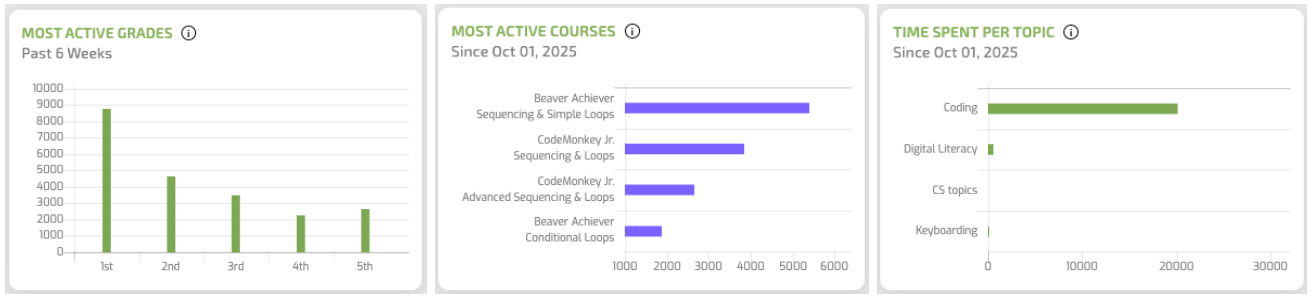
Gráficos de datos actualizados en el panel de administración
As an administrator, you know that data is a valuable resource for evaluating and supporting a product’s effectiveness. We’ve made this process even easier with

New Features: What’s New at CodeMonkey
CodeMonkey is a living product, not a fixed textbook — we’re constantly building new tools based on feedback from teachers and students actually using it in the classroom. This category is where we announce and explain every new feature, update, and improvement as it ships: what changed, why we built it, and how to start using it right away.
Recent updates cover things like:
• Classroom & assignment tools — individual assignments, class sharing, and admin dashboards
• Quizzes & assessment — new quiz experiences and progress tracking, including “Time to Completion”
• Creative tools — updates to Game Builder, the Showroom, and student creations
• Accessibility & login — QR code logins, pair programming, and easier access for younger students
• Course content — new courses, seasonal activities, and curriculum updates
If you’re a teacher wondering how these features actually play out in a real classroom, our Para profesores category has practical, lesson-level guidance to go with them.
As an administrator, you know that data is a valuable resource for evaluating and supporting a product’s effectiveness. We’ve made this process even easier with
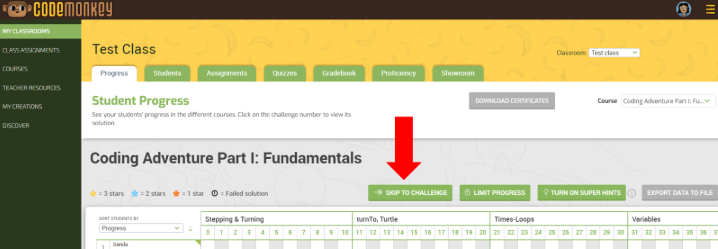
Advance all of your students in a CodeMonkey Classroom at once with one click. 1️⃣ Go to your My Classrooms tab 2️⃣ Click on the
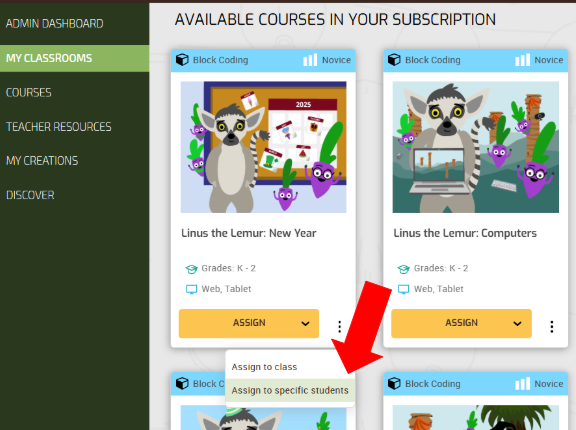
We are thrilled to share a small but mighty update: New Feature – Individual Assignments (Teacher Feature) – This feature gives teachers more control by allowing

The Showroom just got a lillte makeover! Here’s what’s new: And the cherry on top? The Discover button now says “switched” on instead of “turned on” –

“Load Solution” Feature Teachers can now view a 3-star solution directly from their dashboard for any challenge. This feature is perfect for modeling and guiding

Creations Page Refresh The “MY CREATIONS” tab has a fresh new look for both teachers and students! Easily create new games or challenges, access existing
Las cookies necesarias son absolutamente esenciales para que el sitio web funcione correctamente. Esta categoría solo incluye cookies que garantizan funcionalidades básicas y características de seguridad del sitio web. Estas cookies no almacenan ninguna información personal.
| Galleta | Tipo | Duración | Descripción |
|---|---|---|---|
| _codemonkey_session_rails_4 | 1 | 1 año | |
| _Georgia | persistente | 2 años | Esta cookie es instalada por Google Analytics. La cookie se utiliza para calcular los datos de visitantes, sesiones y campañas y realizar un seguimiento del uso del sitio para el informe de análisis del sitio. Las cookies almacenan información de forma anónima y asignan un número generado aleatoriamente para identificar visitantes únicos. |
| cookielawinfo-checkbox-publicidad | persistente | 11 meses | La cookie se establece mediante el consentimiento de cookies del RGPD para registrar el consentimiento del usuario para las cookies en la categoría "Publicidad". |
| cookielawinfo-checkbox-analytics | persistente | 11 meses | Estas cookies están establecidas por el complemento de WordPress de consentimiento de cookies de GDPR. La cookie se utiliza para recordar el consentimiento del usuario para las cookies en la categoría "Análisis". |
| cookielawinfo-checkbox-funcional | persistente | 11 meses | |
| cookielawinfo-checkbox-required | persistente | 11 meses | Esta cookie está configurada por el complemento de consentimiento de cookies de GDPR. Las cookies se utilizan para almacenar el consentimiento del usuario para las cookies en la categoría "Necesarias". |
| cookielawinfo-checkbox-no necesario | 0 | 11 meses | Esta cookie está configurada por el complemento de consentimiento de cookies de GDPR. Las cookies se utilizan para almacenar el consentimiento del usuario para las cookies en la categoría "No necesarias". |
| cookielawinfo-checkbox-otro | persistente | 11 meses | |
| cookielawinfo-checkbox-performance | persistente | 11 meses | Esta cookie se utiliza para realizar un seguimiento de las cookies que el usuario ha aprobado para este sitio. |
| JSESSIONID | 1 | 1 año | Utilizado por sitios escritos en JSP. Cookies de sesión de plataforma de propósito general que se utilizan para mantener el estado de los usuarios en las solicitudes de página. |
| view_cookie_policy | persistente | 1 hora | La cookie está configurada por el complemento de consentimiento de cookies de GDPR y se utiliza para almacenar si el usuario ha dado su consentimiento o no para el uso de cookies. No almacena ningún dato personal. |
| XSRF-TOKEN | persistente | 1 año | La cookie la establece la plataforma de creación de sitios web de Wix en el sitio web de Wix. La cookie se utiliza con fines de seguridad. |
Las cookies que pueden no ser particularmente necesarias para que el sitio web funcione y se utilizan específicamente para recopilar datos personales del usuario a través de análisis, anuncios y otros contenidos integrados se denominan cookies no necesarias. Es obligatorio obtener el consentimiento del usuario antes de ejecutar estas cookies en su sitio web.
| Galleta | Tipo | Duración | Descripción |
|---|---|---|---|
| rlas3 | persistente | 11 meses | La cookie la establece rlcdn.com. La cookie se utiliza para mostrar anuncios relevantes al visitante, así como para limitar el tiempo que el visitante ve una y también para medir la efectividad de la campaña. |
| UserMatchHistory | persistente | 1 mes | Linkedin: se utiliza para rastrear a los visitantes en múltiples sitios web, con el fin de presentar anuncios relevantes según las preferencias del visitante. |
| Galleta | Tipo | Duración | Descripción |
|---|---|---|---|
| __utma | persistente | 2 años | Google Analytics establece esta cookie y se utiliza para distinguir usuarios y sesiones. La cookie se crea cuando se ejecuta la biblioteca JavaScript y no existen cookies __utma. La cookie se actualiza cada vez que se envían datos a Google Analytics. |
| __utmb | persistente | 30 minutos | Google Analytics establece la cookie. La cookie se utiliza para determinar nuevas sesiones / visitas. La cookie se crea cuando se ejecuta la biblioteca JavaScript y no existen cookies __utma. La cookie se actualiza cada vez que se envían datos a Google Analytics. |
| __utmc | persistente | 1 año | Google Analytics establece la cookie y se elimina cuando el usuario cierra el navegador. La cookie no es utilizada por ga.js. La cookie se utiliza para permitir la interoperabilidad con urchin.js, que es una versión anterior de Google Analytics y se utiliza junto con la cookie __utmb para determinar nuevas sesiones / visitas. |
| __utmt | persistente | 10 minutos | Google Analytics establece la cookie y se utiliza para acelerar la tasa de solicitud. |
| __utmz | persistente | 6 meses | Google Analytics establece esta cookie y se utiliza para almacenar la fuente de tráfico o la campaña a través de la cual el visitante llegó a su sitio. |
| _revólver | persistente | 1 minuto | Google Universal Analytics instala estas cookies para acelerar la tasa de solicitud y limitar la recopilación de datos en sitios de alto tráfico. |
| YSC | 1 | 1 año | Estas cookies son establecidas por Youtube y se utilizan para rastrear las vistas de videos incrustados. |
| Galleta | Tipo | Duración | Descripción |
|---|---|---|---|
| _gcl_au | persistente | 3 meses | Google Analytics utiliza esta cookie para comprender la interacción del usuario con el sitio web. |
| _gid | persistente | 1 día | Esta cookie es instalada por Google Analytics. La cookie se utiliza para almacenar información sobre cómo los visitantes usan un sitio web y ayuda a crear un informe analítico de cómo está funcionando el sitio web. Los datos recopilados, incluido el número de visitantes, la fuente de donde provienen y las páginas, se muestran de forma anónima. |
| GPS | persistente | 30 minutos | Esta cookie la establece Youtube y registra una identificación única para rastrear a los usuarios según su ubicación geográfica. |
| SEÑOR | persistente | 5 meses | Esta cookie se utiliza para medir el uso del sitio web con fines analíticos. |
| MUIDB | 1 | 1 año | MicroSoft utiliza esta cookie y recopila datos sobre los usuarios que visitan varios sitios web. Estos datos se utilizan para analizar la eficacia de los anuncios en sitios web. |
| Galleta | Tipo | Duración | Descripción |
|---|---|---|---|
| _fbp | persistente | 3 meses | Facebook establece esta cookie para entregar publicidad cuando están en Facebook o en una plataforma digital impulsada por publicidad de Facebook después de visitar este sitio web. |
| bscookie | 1 | 2 años | Esta cookie es una cookie de identificación del navegador establecida por los botones de compartir vinculados y las etiquetas publicitarias. |
| fr | 1 | 3 meses | Facebook configura la cookie para mostrar anuncios relevantes a los usuarios y medir y mejorar los anuncios. La cookie también rastrea el comportamiento del usuario en la web en sitios que tienen píxeles de Facebook o complementos sociales de Facebook. |
| IDE | 1 | 2 años | Utilizado por Google DoubleClick y almacena información sobre cómo el usuario utiliza el sitio web y cualquier otro anuncio antes de visitar el sitio web. Se utiliza para presentar a los usuarios anuncios que son relevantes para ellos de acuerdo con el perfil del usuario. |
| MUID | persistente | 1 año | Usado por Microsoft como identificador único. La cookie se establece mediante scripts integrados de Microsoft. El propósito de esta cookie es sincronizar la identificación en muchos dominios de Microsoft diferentes para permitir el seguimiento de usuarios. |
| pxrc | persistente | 2 meses | El propósito de la cookie es identificar a un visitante para ofrecer publicidad relevante. |
| rlas3 | persistente | 11 meses | La cookie la establece rlcdn.com. La cookie se utiliza para mostrar anuncios relevantes al visitante, así como para limitar el tiempo que el visitante ve una y también para medir la efectividad de la campaña. |
| skimCSP | persistente | 11 meses | SkimResources establece esta cookie. La cookie se utiliza para registrar datos sobre el visitante con el fin de optimizar la relevancia de las ventajas que se ofrecen a los usuarios. |
| TapAd_DID | persistente | 2 meses | La cookie la coloca tapad.com. El propósito de la cookie es rastrear a los usuarios en todos los dispositivos para permitir publicidad dirigida |
| TapAd_TS | persistente | 2 meses | Tapad.com establece la cookie. El propósito de la cookie es rastrear a los usuarios en todos los dispositivos para permitir publicidad dirigida. |
| TDCPM | persistente | 1 año | El servicio CloudFare configura la cookie para almacenar una identificación única para identificar un dispositivo de usuarios recurrentes que luego se utiliza para publicidad dirigida. |
| TDID | persistente | 1 año | El servicio CloudFare configura la cookie para almacenar una identificación única para identificar un dispositivo de usuarios recurrentes que luego se utiliza para publicidad dirigida. |
| test_cookie | persistente | 15 minutos | Esta cookie la establece doubleclick.net. El propósito de la cookie es determinar si el navegador de los usuarios admite cookies. |
| VISITOR_INFO1_LIVE | 1 | 5 meses | Youtube establece esta cookie. Se utiliza para rastrear la información de los videos de YouTube incrustados en un sitio web. |
| Galleta | Tipo | Duración | Descripción |
|---|---|---|---|
| _scid | persistente | 1 año | |
| _sctr | persistente | 1 año | |
| li_sugr | persistente | 3 meses | |
| lissc | persistente | 11 meses | |
| largarse | persistente | 1 año | |
| TapAd_3WAY_SYNCS | persistente | 2 meses | |
| TapAd_TTD_SYNC | persistente | 2 meses | |
| tu | persistente | 3 meses |
| Galleta | Tipo | Duración | Descripción |
|---|---|---|---|
| bcookie | persistente | 2 años | Esta cookie está configurada por linkedIn. El propósito de la cookie es habilitar las funcionalidades de LinkedIn en la página. |
| lang | persistente | 1 año | Esta cookie se utiliza para almacenar las preferencias de idioma de un usuario para ofrecer contenido en ese idioma almacenado la próxima vez que el usuario visite el sitio web. |
| lidc | persistente | 1 día | LinkedIn establece esta cookie y la utiliza para el enrutamiento. |