Ask a class how Bubble Sort works and you’ll usually get a few nods and a lot of blank looks. Sorting algorithms are a core part of computer science, but on a whiteboard they’re just arrows and numbers. Students have to picture dozens of comparisons and swaps in their heads.
That’s why we built the Sorting Visualizer. It’s the first in our new collection of free interactive CS tools for teachers. It’s free for you and your students, with no sign-up, no download and no paywall.
What the Sorting Visualizer does
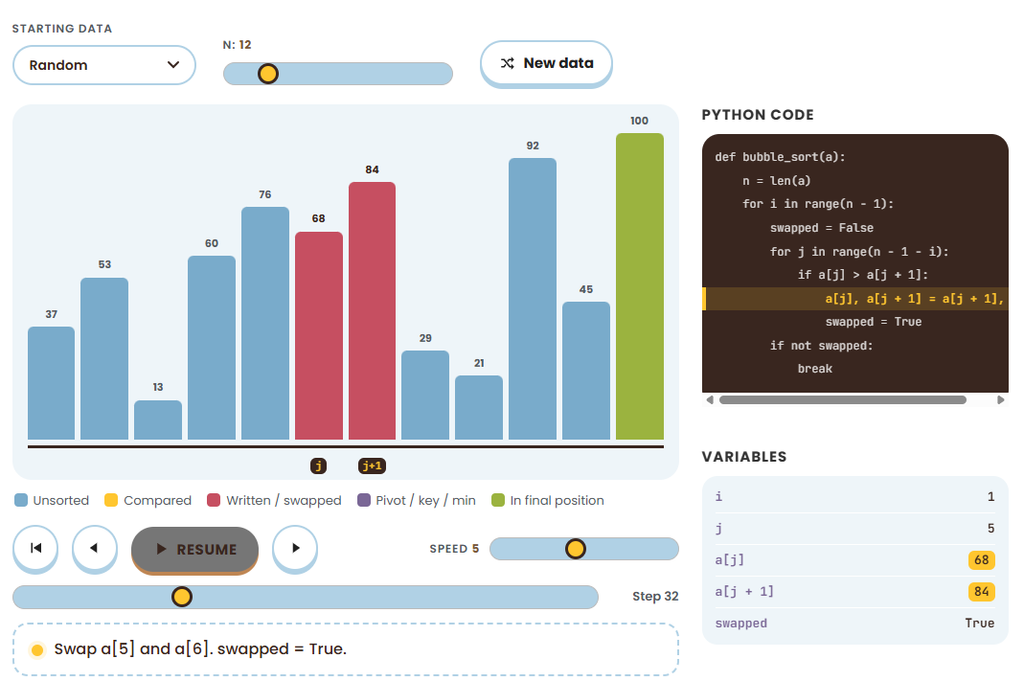
The Sorting Visualizer turns a list of numbers into a row of bars, then sorts them in front of your students. Every check and every swap happens on screen, one step at a time.
- Five classic algorithms. Bubble Sort, Selection Sort, Insertion Sort, Merge Sort and Quick Sort.
- Full playback control. Press Play, change the speed, or step forward and back with the arrow keys. Space pauses and resumes.
- Live counters. Students see how many checks and swaps each algorithm makes as it runs.
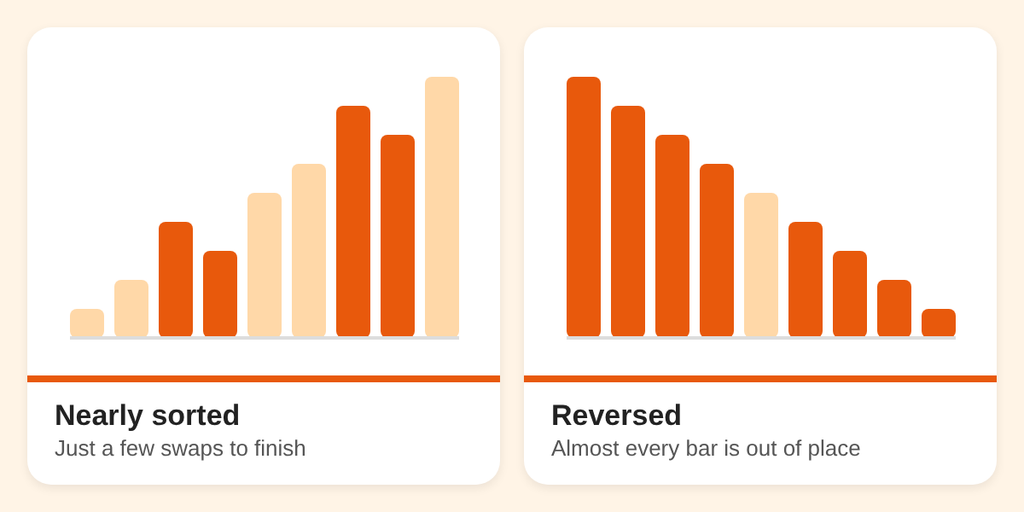
- Different starting data. Sort a random list, a nearly sorted list, a reversed list, or a list with only a few unique values.
- Built-in explanations. Each algorithm comes with a short explanation of how it works and how fast it is.
3 ways to use it in class
1. Predict the next swap
Project Bubble Sort on the board and step through it with the arrow keys. Before each step, ask students which two bars will be compared and whether they’ll swap. It turns a passive demo into a whole-class guessing game.
2. Change the data, compare the counts
Run the same algorithm on a nearly sorted list, then on a reversed list. Have students record the checks and swaps for each. Why does the same algorithm work so much harder on one list than the other?
3. Algorithm showdown
Split the class into five groups and give each group one algorithm. Every group sorts the same kind of data and reports its counts. Then discuss: which algorithm was fastest, and would the winner change with different data?
One tool for every level
The Sorting Visualizer has two levels, so it fits beginners and AP students alike.
- Easy mode explains each step in plain English. It’s a good fit for students seeing sorting for the first time.
- Advanced mode adds Python code, live variables and Big-O. It’s a good fit for AP CS Principles or an intro to algorithms course.
Want students to open a specific level? Add ?level=easy or ?level=advanced to the end of the link before you share it.
The tool runs in any modern browser on Chromebooks, Windows and Mac computers, and iPads and other tablets. Project it for a whole-class demo, or share the link so students can explore on their own devices.
Share it anywhere
You have our permission to share the Sorting Visualizer wherever it helps. Post the link on your class page, your school’s resources page or your district’s teacher hub.
More free tools are on the way
The Sorting Visualizer is one of four free tools available now. The others are the Logic Gate Simulator, the Data Structure Playground y Search Race. We’re building more.
Try the Sorting Visualizer now, free with no sign-up.